|
Numeric solution of ODE BVPs with many parameters
Author of this Maple worksheet: Carl Love <mailto:carl.j.love@gmail.com>, 14-Oct-2018
This worksheet is a critique of and an attempt to reproduce all numeric computations in the paper:
M. Sheikholeslami, D.D. Ganji, M.M. Rashidi, "Magnetic field effect on unsteady flow and heat transfer using Buongiorno model", Journal of Magnetism and Magnetic Materials, 416 (2016) 164-173, Elsevier, 11-May-2016, http://dx.doi.org/10.1016/j.jmmm.2016.05.026
That paper's authors' affiliations and email addresses:
M. Sheikholeslami: Department of Mechanical Engineering, Babol Univeristy of Technology, Babol, Islamic Republic of Iran <mohsen.sheikholeslami@yahoo.com>, <m.sheikholeslmai@stu.nit.ac.ir>,
D.D. Ganji: Department of Mechanical Engineering, Babol Univeristy of Technology, Babol, Islamic Republic of Iran <mirgang@nit.ac.ir>,
M.M. Rashidi: Shanghai Key Lab of Vehicle Aerodynamics and Vehicle Thermal Management Systems, Tongji Univeristy, 4800 Cao An Road, Shanghai 201804, China (no email address given).
All references to Equation numbers, Figure numbers, and Table numbers in this worksheet are from that paper.
| > |
Digits:= trunc(evalhf(Digits)); #generally a very efficient setting
|

Setup of BVP system:
| > |
#ordinary differential equations:
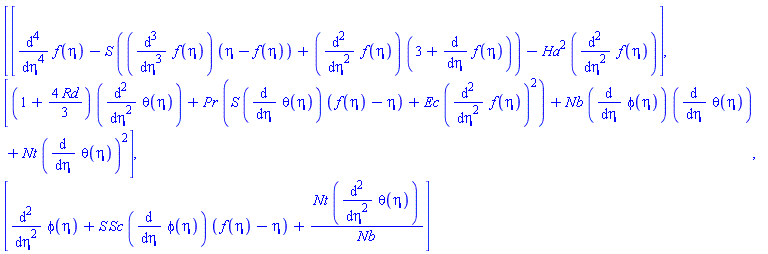
ODEs:= [
#Eq 8:
diff(f(eta),eta$4)
- S*(diff(f(eta),eta$3)*(eta-f(eta)) + diff(f(eta),eta$2)*(3+diff(f(eta),eta)))
- Ha^2*diff(f(eta),eta$2),
#Eq 9:
(1+4/3*Rd)*diff(theta(eta),eta$2)
+ Pr*(S*diff(theta(eta),eta)*(f(eta)-eta) + Ec*diff(f(eta),eta$2)^2)
+ Nb*diff(phi(eta),eta)*diff(theta(eta),eta) + Nt*diff(theta(eta),eta)^2,
#Eq 10:
diff(phi(eta),eta$2) + S*Sc*diff(phi(eta),eta)*(f(eta)-eta)
+ Nt/Nb*diff(theta(eta),eta$2)
#All these ODEs are implicitly equated to 0.
]:
<ODEs[]>; #Display the ODEs.
|
| > |
#lower and upper boundary values of the independent variable:
(LB,UB):= (0,1): #Eq 11
#boundary conditions:
BCs:= [
#Eq 11:
([f, (D@@2)(f), D(theta), D(phi)](LB) =~ [0, 0, 0, 0])[],
([f, D(f), theta, phi](UB) =~ [1, 0, 1, 1])[]
];
|
![[f(0) = 0, ((D@@2)(f))(0) = 0, (D(theta))(0) = 0, (D(phi))(0) = 0, f(1) = 1, (D(f))(1) = 0, theta(1) = 1, phi(1) = 1]](/view.aspx?sf=209715_post/456bb1b6292d8193d9455a0ac5cc3d24.gif)
| > |
#parameters (input values to BVP system) and their default values:
Params:= Record(
#Eq 12:
S= 0.5, #Squeeze number
Pr= 10., #Prandtl number
Ec= 0.1, #Eckert number
Sc= 0.5, #Schmidt number
Ha= 2., #Hartman number
Nb= 0.15, #Brownian motion parameter
Nt= 0.15, #thermophoretic parameter
Rd= 4.5 #radiation parameter
):
|
| > |
#Named special computed boundary values (output values of the system): Note that each adds
#exactly one parameter and one boundary condition to the system.
NBVs:= [
-(D@@2)(f)(1) = `C*__f`, #Eq 13: Skin friction coefficient
-D(theta)(1) = `Nu*` #Eq 14: Nusselt number
]:
#just rewriting the above names in a more-convenient form:
Nu:= `Nu*`:
Cf:= `C*__f`:
|
| > |
#Appliable module that calls dsolve for each
#particular configuration of parameter values. (Maple's numeric BVPs require a separate
#dsolve invocation for each specific set of parameter values (unlike IVPs, which can be
#parameterized into a single dsolve invocation).)
#
#For every dsolve call through this module, the NBVs are evaluated and saved.
Solve:= module()
local
nbvs_rhs:= rhs~(:-NBVs), #just the names
Sol, #numeric dsolve BVP solution of any 'output' form
ModuleApply:= subs(
_Sys= {:-ODEs[], :-BCs[], :-NBVs[]},
proc({
#These are just default parameter values: They can be changed when the
#procedure is called.
S::realcons:= Params:-S,
Pr::realcons:= Params:-Pr,
Ec::realcons:= Params:-Ec,
Sc::realcons:= Params:-Sc,
Ha::realcons:= Params:-Ha,
Nb::realcons:= Params:-Nb,
Nt::realcons:= Params:-Nt,
Rd::realcons:= Params:-Rd
#By extracting the default values from record Params, it is possible to change
#them by changing the record.
})
Sol:= dsolve(_Sys, _rest, numeric);
AccumData(Sol, {_options});
Sol
end proc
),
AccumData:= proc(
Sol::{Matrix, procedure, list({name, function}= procedure)},
params::set(name= realcons)
)
local n, nbvs;
if Sol::Matrix then
nbvs:= seq(n = Sol[2,1][1,Pos(n)], n= nbvs_rhs)
else
nbvs:= (nbvs_rhs =~ eval(nbvs_rhs, Sol(:-LB)))[]
fi;
SavedData[params]:= Record[packed](params[], nbvs)
end proc,
ModuleLoad:= eval(Init)
;
export
SavedData, #table of Records
Pos, #Matrix column indices of nbvs
Init:= proc()
Pos:= proc(n::name) option remember; local p; member(n, Sol[1,1], 'p'); p end proc;
SavedData:= table();
return
end proc
;
ModuleLoad()
end module:
|
Now we attempt to recreate all the numeric computations of the paper.
Figure 1 is conceptual, not computational, so there's no point in trying to reproduce it here.
I can't attempt to reproduce Table 1 or Figure 2 because the paper doesn't specify the values of all the parameters used for those.
Recreate Figure 3:
| > |
colseq:= [red, green, blue, brown]:
|
| > |
#parameter values that remain fixed for the entire set of plots:
Pc:= Sc= 0.5, Nb= 0.1, Ec= 0.1, Pr= 10:
|
| > |
#parameter values that remain fixed with each of the four plots::
Ps:= [
[S= 0.5, Ha= 2, Nt= 0.1],
[Ha= 2, Rd= 0.5, Nt= 0.1],
[S= 0.5, Rd= 0.5, Nt= 0.1],
[S= 0.5, Ha= 2, Rd= 0.5]
]:
#parameter value for each curve
Pv:= [
Rd= [0.5, 2, 4, 8],
S= [2, 4, 8, 12],
Ha= [2, 4, 8, 12],
Nt= [0.01, 0.05, 0.1, 0.2]
]:
|
| > |
for i to nops(Ps) do
plots:-display(
[seq(
plots:-odeplot(
Solve(lhs(Pv[i])= rhs(Pv[i])[j], Ps[i][], Pc),
[eta, theta(eta)], 'color'= colseq[j], 'legend'= [lhs(Pv[i])= rhs(Pv[i])[j]]
),
j= 1..nops(rhs(Pv[i]))
)],
'axes'= 'boxed', 'gridlines'= false,
'labelfont'= ['TIMES', 'BOLDOBLIQUE', 16],
'caption'= nprintf(
cat("\n%a = %4.2f, "$nops(Ps[i])-1, "%a = %4.2f\n\n"), (lhs,rhs)~(Ps[i])[]
),
'captionfont'= ['TIMES', 16]
)
od;
|
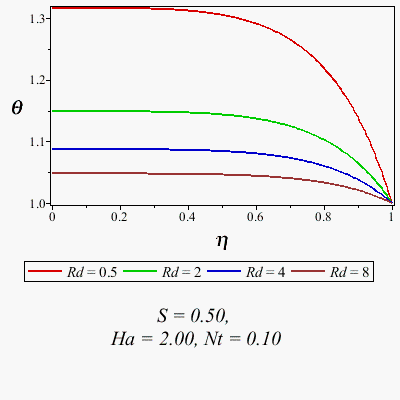
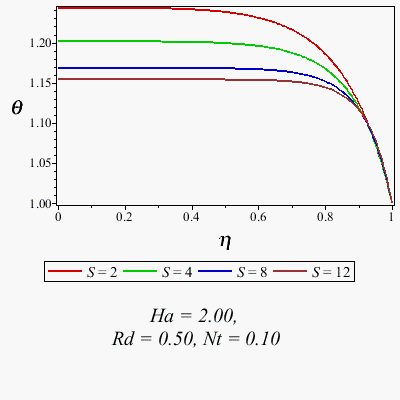
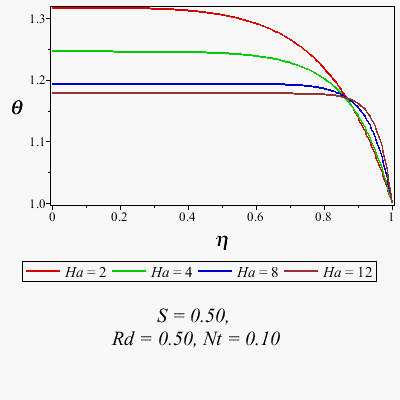
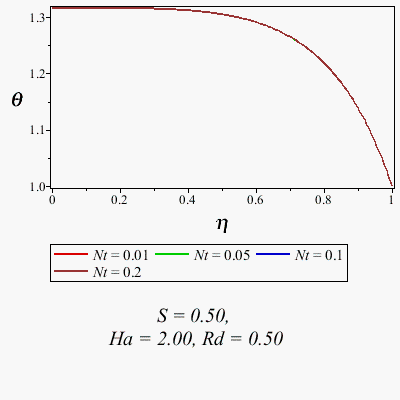
The 4 plots agree with those in Fig. 3 in the paper.
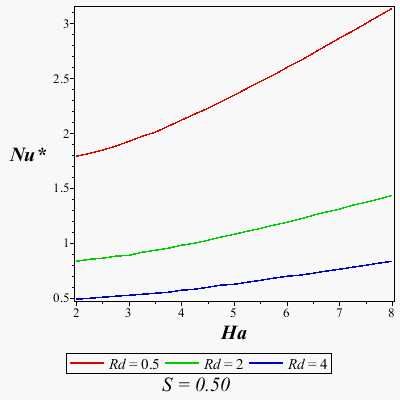
Recreate Fig. 4.
| > |
#procedure that generates a 2-D plot of an expression versus a varied parameter:
ParamPlot2d:= proc(
Y::{procedure, `module`}, #procedure that extracts y-value from Solve's dsolve solution
X::name= range(realcons), #x-axis-parameter range
FP::list(name= realcons), #fixed values of other parameters
{
eta::realcons:= :-LB, #independent variable value
dsolveopts::list({name, name= anything}):= []
}
)
plot(
x-> Y(
Solve(
lhs(X)= x, FP[],
#Default dsolve options can be changed by setting 'dsolveopts':
'abserr'= 0.5e-7, 'interpolant'= false, 'output'= Array([eta]), dsolveopts[]
)
),
rhs(X),
#Default plot options can be changed by putting the option in the ParamPlot2d call:
'numpoints'= 25, 'axes'= 'boxed', 'gridlines'= false,
'labelfont'= ['TIMES', 'BOLDOBLIQUE', 16],
'caption'= nprintf(cat("%a = %4.2f, "$nops(FP)-1, "%a = %4.2f"), (lhs,rhs)~(FP)[]),
'captionfont'= ['TIMES', 16],
_rest
)
end proc:
|
| > |
#procedure that extracts Nusselt number from dsolve solution:
GetNu:= (Sol::Matrix)-> Sol[2,1][1, Solve:-Pos(:-Nu)]:
|
| > |
RD:= [0.5, 2, 4]:
plots:-display(
[seq(
ParamPlot2d(
GetNu, Ha= 2..8, [S= 0.5],
dsolveopts= [Rd= RD[k], Sc= 0.5, Nb= 0.1, Ec= 0.1, Nt= 0.1, Pr= 10],
'legend'= [Rd= RD[k]], 'color'= colseq[k], 'labels'= [Ha, Nu]
),
k= 1..nops(RD)
)]
);
|
| > |
SV:= [0.5, 2, 4]:
plots:-display(
[seq(
ParamPlot2d(
GetNu, Ha= 2..8, [Rd= 0.5],
dsolveopts= [S= SV[k], Sc= 0.5, Nb= 0.1, Ec= 0.1, Nt= 0.1, Pr= 10],
'legend'= [S= SV[k]], 'color'= colseq[k], 'labels'= [Ha, Nu]
),
k= 1..nops(SV)
)]
)
|
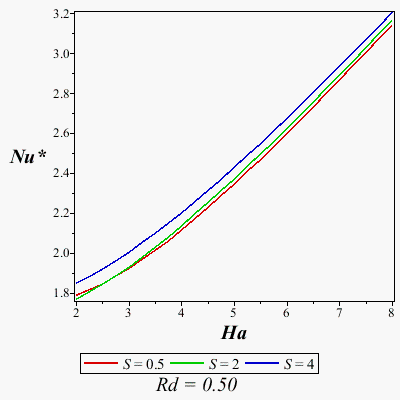
The above two plots match those of Fig. 4 in the paper.
| > |
#procedure that generates 3-D plots (dropped-shadow contour + surface) of an expression
#versus two varied parameters:
ParamPlot3d:= proc(
Z::{procedure, `module`}, #procedure that extracts z-value from Solve's dsolve solution
X::name= range(realcons), #x-axis-parameter range
Y::name= range(realcons), #y-axis-parameter range
FP::list(name= realcons), #fixed values of other parameters
{
#fraction of empty space above and below plot (larger "below"
#value improves view of dropped-shadow contourplot):
zmargin::[realcons,realcons]:= [.05,0.15],
eta::realcons:= :-LB, #independent variable value
dsolveopts::list({name, name= anything}):= [],
contouropts::list({name, name= anything}):= [],
surfaceopts::list({name, name= anything}):=[]
}
)
local
LX:= lhs(X), RX:= rhs(X), LY:= lhs(Y), RY:= rhs(Y),
Zremember:= proc(x,y)
option remember; #Used because 'grid' should be the same for both plots.
Z(
Solve(
LX= x, LY= y, FP[],
#Default dsolve options can be changed by setting 'dsolveopts':
'abserr'= 0.5e-7, 'interpolant'= false, 'output'= Array([eta]),
dsolveopts[]
)
)
end proc,
plotspec:= (Zremember, RX, RY),
C:= plots:-contourplot(
plotspec,
#These default plot options can be changed by setting 'contouropts':
'grid'= [25,25], 'contours'= 5, 'filled',
'coloring'= ['yellow', 'orange'], 'color'= 'green',
contouropts[]
),
P:= plot3d(
plotspec,
#These default plot options can be changed by setting 'surfaceopts':
'grid'= [25,25], 'style'= 'surfacecontour', 'contours'= 6,
surfaceopts[]
),
U, L #z-axis endpoints after margin adjustment
;
#Stretch z-axis to include margins:
(U,L):= ((Um,Lm,M,m)-> (M*(Lm-1)+m*Um, M*Lm+m*(Um-1)) /~ (Um+Lm-1))(
zmargin[],
(max,min)(op(3, indets(P, 'specfunc'('GRID'))[])) #actual z-axis range
);
plots:-display( #final plot to display/return
[
plots:-spacecurve(
{
[[lhs(RX),rhs(RY),U],[rhs(RX),rhs(RY),U],[rhs(RX),rhs(RY),L]], #yz backwall
[[rhs(RX),rhs(RY),U],[rhs(RX),lhs(RY),U],[rhs(RX),lhs(RY),L]] #xz backwall
},
'color'= 'grey', 'thickness'= 0
),
plottools:-transform((x,y)-> [x,y,L])(C), #dropped-shadow contours
P
],
#These default plot options can be changed simply by putting the option in the
#ParamPlot3d call:
'view'= ['DEFAULT', 'DEFAULT', L..U], 'orientation'= [-135, 75], 'axes'= 'frame',
'labels'= [lhs(X), lhs(Y), Z], 'labelfont'= ['TIMES', 'BOLDOBLIQUE', 16],
'caption'= nprintf(cat("%a = %4.2f, "$nops(FP)-1, "%a = %4.2f"), (lhs,rhs)~(FP)[]),
'captionfont'= ['TIMES', 14],
'projection'= 2/3,
_rest
)
end proc:
|
Reproduce the twelve 3-D plots of Figure 5. Note that every plot uses a default grid of 25x25, so requires 625 complete solutions of the BVP. So, this might be slower than you expect.
| > |
ParamPlot3d(
GetNu, S= 0..12, Ha= 0..12, [Rd= 4.5, Ec= 0.06, Nb= 0.15, Nt= 0.15, Sc= 0.5],
labels= [S, Ha, Nu]
);
|
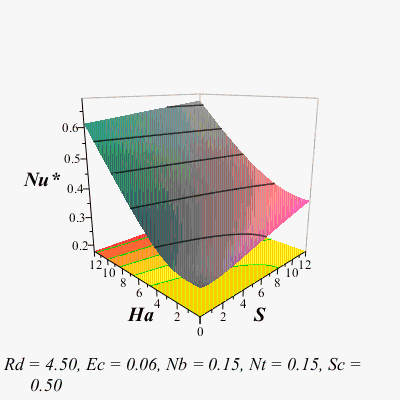
The above plot matches the paper.
| > |
ParamPlot3d(
GetNu, S= 0..12, Rd= 1..8, [Ha= 6, Ec= 0.06, Nb= 0.15, Nt= 0.15, Sc= 0.5],
labels= [S, Rd, Nu]
);
|
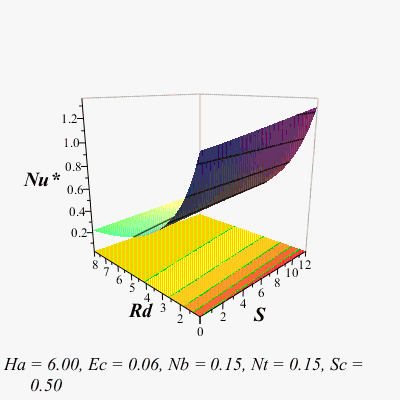
The above plot matches the paper.
| > |
ParamPlot3d(
GetNu, S= 0..12, Ec= 0.01..0.10, [Ha= 6, Rd= 4.5, Nb= 0.15, Nt= 0.15, Sc= 0.5],
labels= [S, Ec, Nu]
);
|
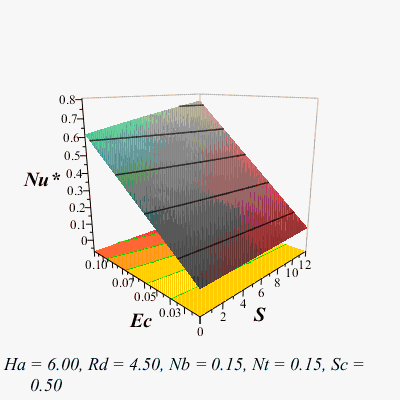
The above plot matches the paper.
| > |
ParamPlot3d(
GetNu, S= 0..12, Nt= 0.1..0.2, [Ha= 6, Rd= 4.5, Ec= 0.06, Nb= 0.15, Sc= 0.5],
labels= [S, Nt, Nu]
);
|
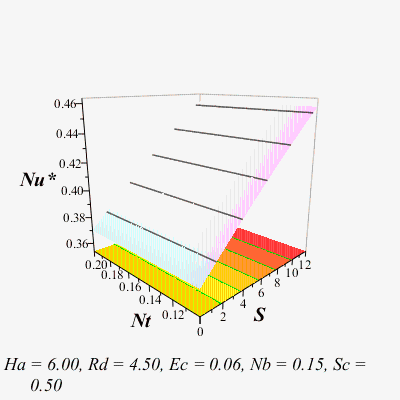
The above plot doesn't match the corresponding one in the paper!
| > |
ParamPlot3d(
GetNu, Ha= 0..12, Rd= 1.0..8.0, [S= 6, Ec= 0.06, Nb= 0.15, Nt= 0.15, Sc= 0.5],
labels= [Ha, Rd, Nu]
);
|
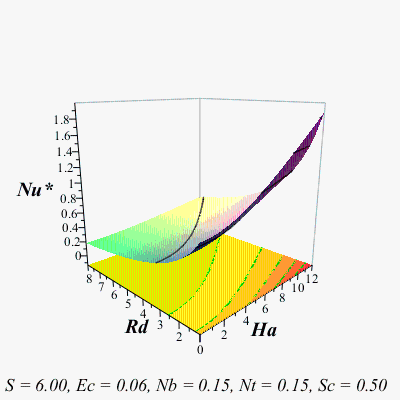
The above plot matches the paper.
| > |
ParamPlot3d(
GetNu, Ha= 0..12, Ec= 0.01..0.1, [S= 6, Rd= 4.5, Nb= 0.15, Nt= 0.15, Sc= 0.5],
labels= [Ha, Ec, Nu]
);
|
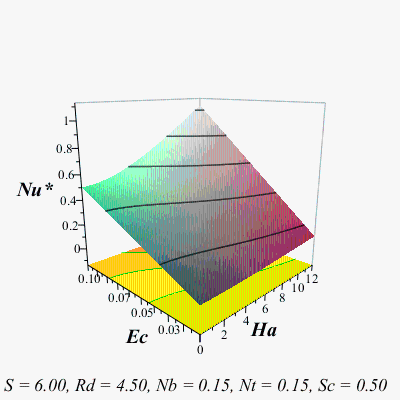
The above plot matches the paper.
| > |
ParamPlot3d(
GetNu, Ha= 0..12, Nt= 0.1..0.2, [S= 6, Rd= 4.5, Ec= 0.06, Nb= 0.15, Sc= 0.5],
labels= [Ha, Nt, Nu]
);
|
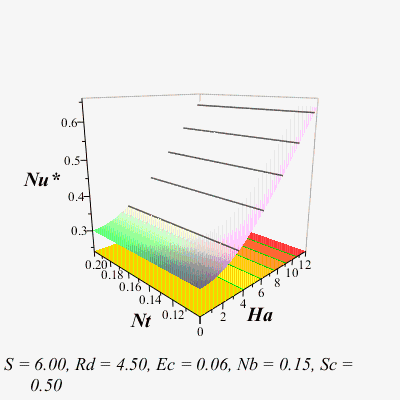
The above plot matches the paper.
| > |
ParamPlot3d(
GetNu, Ha= 0..12, Nb= 0.1..0.2, [S= 6, Rd= 4.5, Ec= 0.06, Nt= 0.15, Sc= 0.5],
labels= [Ha, Nb, Nu]
);
|
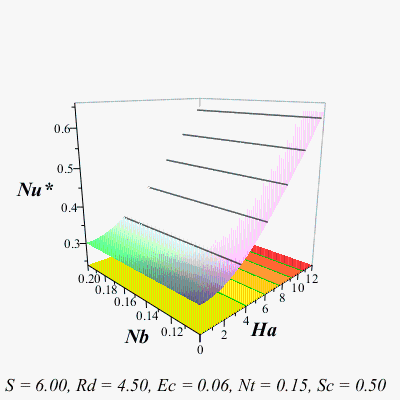
The above plot matches the paper.
| > |
ParamPlot3d(
GetNu, Rd= 1.0..8.0, Nt= 0.1..0.2, [S= 6, Ha= 6, Ec= 0.06, Nb= 0.15, Sc= 0.5],
labels= [Rd, Nt, Nu]
);
|
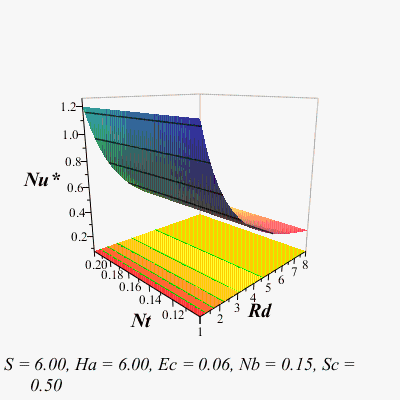
The above plot matches the paper.
| > |
ParamPlot3d(
GetNu, Rd= 1.0..8., Nb= 0.1..0.2, [S= 6, Ha= 6, Ec= 0.06, Nt= 0.15, Sc= 0.5],
labels= [Rd, Nb, Nu]
);
|
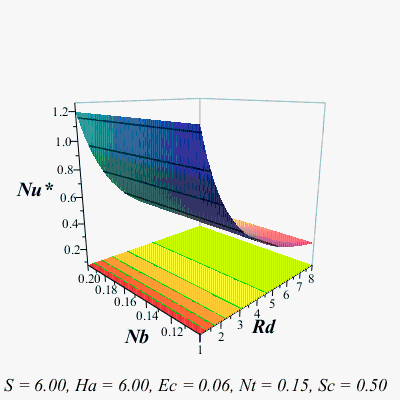
The above plot matches the paper.
| > |
ParamPlot3d(
GetNu, Ec= 0.01..0.1, Nt= 0.1..0.2, [S= 6, Ha= 6, Rd= 4.5, Nb= 0.15, Sc= 0.5],
labels= [Ec, Nt, Nu]
);
|
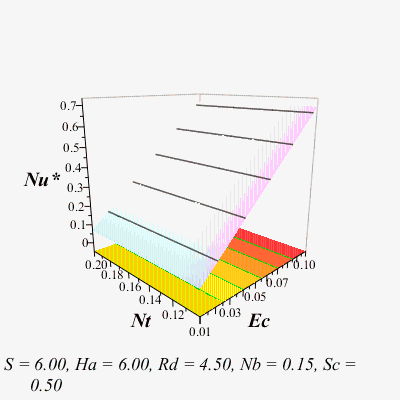
| > |
ParamPlot3d(
GetNu, Ec= 0.01..0.1, Nb= 0.1..0.2, [S= 6, Ha= 6, Rd= 4.5, Nt= 0.15, Sc= 0.5],
labels= [Ec, Nb, Nu]
);
|
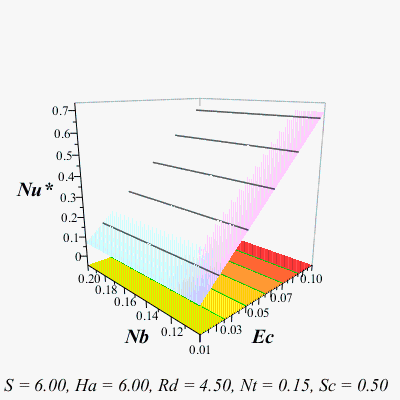
The above plot does not match the corresponding one in the paper!
Recreate Fig. 6:
| > |
#parameter values that remain fixed for the entire set of plots:
Pc:= Sc= 0.5, Ec= 0.1, Pr= 10:
|
| > |
#parameter values that remain fixed within each plot:
Ps:= [
[S= 0.5, Ha= 2, Nt= 0.1, Nb= 0.1],
[Ha= 2, Rd= 0.5, Nt= 0.1, Nb= 0.1],
[S= 0.5, Rd= 0.5, Nt= 0.1, Nb= 0.1],
[S= 0.5, Ha= 2, Rd= 0.5, Nb= 0.1],
[S= 0.5, Ha= 2, Rd= 0.5, Nt= 0.1]
]:
#parameter value for each curve in each plot
Pv:= [
Rd = [0.5, 2, 4, 8],
S= [2, 4, 8, 12],
Ha= [2, 4, 8, 12],
Nt= [0.01, 0.05, 0.1, 0.2],
Nb= [0.1, 0.2, 0.4, 0.6]
]:
|
| > |
for i to nops(Ps) do
plots:-display(
[seq(
plots:-odeplot(
Solve(lhs(Pv[i])= rhs(Pv[i])[j], Ps[i][], Pc),
[eta, phi(eta)], 'color'= colseq[j], 'legend'= [lhs(Pv[i])= rhs(Pv[i])[j]]
),
j= 1..nops(rhs(Pv[i]))
)],
'axes'= 'boxed', 'gridlines'= false,
'labelfont'= ['TIMES', 'BOLDOBLIQUE', 16],
'caption'= nprintf(
cat("\n%a = %4.2f, "$nops(Ps[i])-1, "%a = %4.2f\n\n"), (lhs,rhs)~(Ps[i])[]
),
'captionfont'= ['TIMES', 16]
)
od;
|
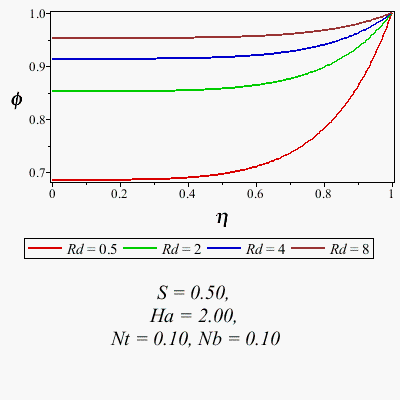
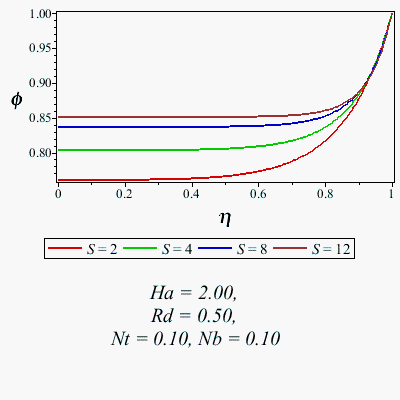
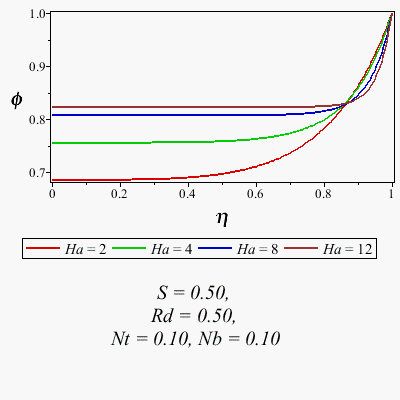
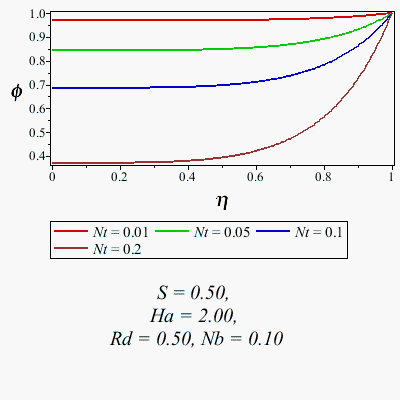
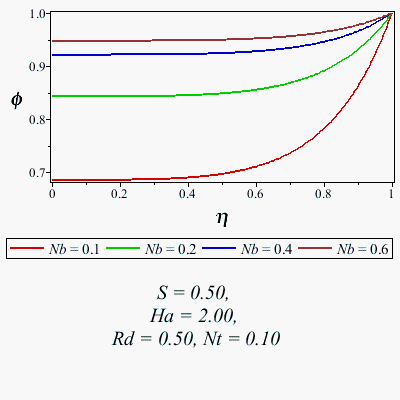
The five plots above match Fig. 6 from the paper.
Generate Eq. 31: At this point, we have a huge database of Nusselt numbers (15,186 records to be exact) computed at various parameter values.
| > |
NusseltList:= [entries(Solve:-SavedData, nolist)]:
|

Sheikholeslami, et al, call these the "active parameters" (because they're the ones that have varied in the above computations):
| > |
V:= [S, Ha, Rd, Ec, Nt, Nb]:
|
| > |
NusseltData:= Matrix(map(R-> [map(v-> R[v], V)[], R[Nu]], NusseltList));
|
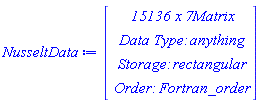
Sheikholeslami, et al, (without providing a single computational detail) present in Eq. 31 a fitted degree-2 polynomial in the active variables
| > |
OrdInner:= proc(x::name) local p; member(x,V,'p'); p end proc:
|
| > |
OrdOuter:= (xx::[name,name])-> OrdInner(xx[1])*nops(V)+OrdInner(xx[2]):
|
| > |
Fit:= Statistics:-LinearFit(
[ #Use same parameter order as Sheikholeslami:
1,
V[],
mul~(sort(sort~(combinat:-choose(V,2), key= OrdInner), key= OrdOuter))[],
(V^~2)[]
],
NusseltData, V, output= solutionmodule
);
|

| > |
eval("leastsquaresfunction", Fit:-Results());
|

The above polynomial does not match the one in the paper. Indeed, not a single coefficient matches to even 1 significant digit!
Conclusion: Sheikholeslami is full of baloney.
|






