|
Quantum Runge-Lenz Vector and the Hydrogen Atom,
the hidden SO(4) symmetry using Computer Algebra
Pascal Szriftgiser1 and Edgardo S. Cheb-Terrab2
(1) University of Lille, CNRS, UMR 8523 - PhLAM - Physique des Lasers, Atomes et Molécules, F-59000 Lille, France
(2) Maplesoft

Abstract
Pauli first noticed the hidden SO(4) symmetry for the Hydrogen atom in the early stages of quantum mechanics [1]. Departing from that symmetry, one can recover the spectrum of a spinless hydrogen atom and the degeneracy of its states without explicitly solving Schrödinger's equation [2]. In this paper, we derive that SO(4) symmetry and spectrum using a computer algebra system (CAS). While this problem is well known [3, 4], its solution involves several steps of manipulating expressions with tensorial quantum operators, simplifying them by taking into account a combination of commutator rules and Einstein's sum rule for repeated indices. Therefore, it is an excellent model to test the current status of CAS concerning this kind of quantum-and-tensor-algebra computations. Generally speaking, when capable, CAS can significantly help with manipulations that, like non-commutative tensor calculus subject to algebra rules, are tedious, time-consuming and error-prone. The presentation also shows a pattern of computer algebra operations that can be useful for systematically tackling more complicated symbolic problems of this kind.
Introduction
The primary purpose of this work is to derive, step-by-step, the SO(4) symmetry of the Hydrogen atom and its spectrum using a computer algebra system (CAS). To the best of our knowledge, such a derivation using symbolic computation has not been shown before. Part of the goal was also to see whether this computation can be performed entering only the main definition formulas, followed by only simplification commands, and without using previous knowledge of the result. The intricacy of this problem is in the symbolic manipulation and simplification of expressions involving noncommutative quantum tensor operators. The simplifications need to take into account commutator rules, symmetries under permutation of indices of tensorial subexpressions, and use Einstein's sum rule for repeated indices.
We performed the derivation using the Maple 2020 system with the Maplesoft Physics Updates v.705. Generally speaking, the default computational domain of CAS doesn't include tensors, noncommutative operators nor related simplifications. On the other hand, the Maple system is distributed with a Physics package that extends that default domain to include those objects and related operations. Physics includes a Simplify command that takes into account custom algebra rules and the sum rule for repeated indices, and uses tensor-simplification algorithms [5] extended to the noncommutative domain.
A note about notation: when working with a CAS, besides the expectation of achieving a correct result for a complicated symbolic calculation, readability is also an issue. It is desired that one be able to enter the definition formulas and computational steps to be performed (the input, preceded by a prompt >, displayed in black) in a way that resembles as closely as possible their paper and pencil representation, and that the results (the output, computed by Maple, displayed in blue) use textbook mathematical-physics notation. The Physics package implements such dedicated typesetting. In what follows, within text and in the output, noncommutative objects are displayed using a different color, e.g.  , vectors and tensor indices are displayed the standard way, as in , vectors and tensor indices are displayed the standard way, as in  , and , and ![L[q]](/view.aspx?sf=208810_post/3bec9ed086322a6613d8911728926ddf.gif) , and commutators are displayed with a minus subscript, e.g. , and commutators are displayed with a minus subscript, e.g. !["[H,L[q]][-]"](/view.aspx?sf=208810_post/ff2d738ba457e5df4394dbd66f14cca9.gif) . Although the Maple system allows for providing dedicated typesetting also for the input, we preferred to keep visible the Maple input syntax, allowing for comparison with paper and pencil notation. We collected the names of the commands used and a one line description for them in an Appendix at the end. Maple also implements the concept of inert representations of computations, which are activated only when desired. We use this feature in several places. Inert computations are entered by preceding the command with % and are displayed in grey. Finally, as is usual in CAS, every output has an equation label, which we use throughout the presentation to refer to previous intermediate results. . Although the Maple system allows for providing dedicated typesetting also for the input, we preferred to keep visible the Maple input syntax, allowing for comparison with paper and pencil notation. We collected the names of the commands used and a one line description for them in an Appendix at the end. Maple also implements the concept of inert representations of computations, which are activated only when desired. We use this feature in several places. Inert computations are entered by preceding the command with % and are displayed in grey. Finally, as is usual in CAS, every output has an equation label, which we use throughout the presentation to refer to previous intermediate results.
In Sec.1, we recall the standard formulation of the problem and present the computational goal, which is the derivation of the formulas representing the SO(4) symmetry and related spectrum.
In Sec.2, we set tensorial non-commutative operators representing position and linear and angular momentum, respectively ![X[a]](/view.aspx?sf=208810_post/a8b77c967bc7949b85fe5b2eb6d191d0.gif) , , ![p[a]](/view.aspx?sf=208810_post/c5be438b323d649ead8c46bdbea261c3.gif) and and ![L[a]](/view.aspx?sf=208810_post/c9a7dd6d7ce76aa5027856057d4801c6.gif) , their commutation rules used as departure point, and the form of the quantum Hamiltonian , their commutation rules used as departure point, and the form of the quantum Hamiltonian  . We also derive a few related identities used in the sections that follow. . We also derive a few related identities used in the sections that follow.
In Sec.3, we derive the conservation of both angular momentum and the Runge-Lenz quantum operator, respectively !["[H,L[q]][-]=0"](/view.aspx?sf=208810_post/ab018627e8b2eb49f08f99fa87a7484d.gif) and and !["[H,Z[k]][-]=0"](/view.aspx?sf=208810_post/b18cab8c6a6f324905ab409a8c3fabb8.gif) . Taking advantage of the differentialoperators functionality in the Physics package, we perform the derivation exploring two equivalent approaches; first using only a symbolic tensor representation . Taking advantage of the differentialoperators functionality in the Physics package, we perform the derivation exploring two equivalent approaches; first using only a symbolic tensor representation ![p[j]](/view.aspx?sf=208810_post/6c60e5e8f5fbc8ce526155e008a46487.gif) of the momentum operator, then using an explicit differential operator representation for it in configuration space, of the momentum operator, then using an explicit differential operator representation for it in configuration space, ![p[j] = -i*`ℏ`*`∂`[j]](/view.aspx?sf=208810_post/c8441875c37c0a07a1e9f815f202a2b6.gif) . With the first approach, expressions are simplified only using the departing commutation rules and Einstein's sum rule for repeated indices. Using the second approach, the problem is additionally transformed into one where the differentiation operators are applied explicitly to a test function . With the first approach, expressions are simplified only using the departing commutation rules and Einstein's sum rule for repeated indices. Using the second approach, the problem is additionally transformed into one where the differentiation operators are applied explicitly to a test function  . Presenting both approaches is of potential interest as it offers two partly independent methods for performing the same computation, which is helpful to provide confidence on in the results when unknown, a relevant issue when using computer algebra. . Presenting both approaches is of potential interest as it offers two partly independent methods for performing the same computation, which is helpful to provide confidence on in the results when unknown, a relevant issue when using computer algebra.
In Sec. 4, we derive ![%Commutator(L[m], Z[n]) = I*`ℏ`*`ε`[m, n, u]*Z[u]](/view.aspx?sf=208810_post/bda90d51c7a607eaede6d918adac2690.gif) and show that the classical relation between angular momentum and the Runge-Lenz vectors, and show that the classical relation between angular momentum and the Runge-Lenz vectors,   = 0, due to the orbital momentum being perpendicular to the elliptic plane of motion while the Runge-Lenz vector lies in that plane, still holds in quantum mechanics, where the components of these quantum vector operators do not commute but = 0, due to the orbital momentum being perpendicular to the elliptic plane of motion while the Runge-Lenz vector lies in that plane, still holds in quantum mechanics, where the components of these quantum vector operators do not commute but   = =  
In Sec. 5, we derive !["[Z[a],Z[b]][-]=-(2 i `ℏ` `ε`[a,b,c] (H L[c]))/`m__e`"](/view.aspx?sf=208810_post/317d2d7cf2ef916b5343ab97509a5bcc.gif) using the two alternative approaches described for Sec.3. using the two alternative approaches described for Sec.3.
In Sec. 6, we derive the well-known formula for the square of the Runge-Lenz vector, ![Z[k]^2 = 2*H*(`ℏ`^2+L[a]^2)/m__e+kappa^2](/view.aspx?sf=208810_post/fbb1482c6918dbba0323d916d9968cea.gif) . .
Finally, in Sec. 7, we use the SO(4) algebra derived in the previous sections to obtain the spectrum of the Hydrogen atom. Following the literature, this approach is limited to the bound states for which the energy is negative.
Some concluding remarks are presented at the end, and input syntax details are summarized in an Appendix.
| |
1. The hidden SO(4) symmetry of the Hydrogen atom
|
| |
Let's consider the Hydrogen atom and its Hamiltonian
,mo("→"))`)^2/(2*m__e)-kappa/r](/view.aspx?sf=208810_post/a407a5dcd41c044b4c307e36d88950a7.gif) , ,
where  is the electron momentum, is the electron momentum,  its mass, κ a real positive constant, its mass, κ a real positive constant, ,mo("→"))`), sqrt(X[a]^2))](/view.aspx?sf=208810_post/fe200ccb895ebc88ecef4c14e1d0484b.gif) the distance of the electron from the proton located at the origin, and the distance of the electron from the proton located at the origin, and ![X[a]](/view.aspx?sf=208810_post/d12532d5a817156a764590be8deb7bf0.gif) is its tensorial representation with components [ is its tensorial representation with components [!["x, y,z]"](/view.aspx?sf=208810_post/35d94533d090c3051639b820671c3770.gif) . We assume that the proton's mass is infinite. The electron and nucleus spin are not taken into account. Classically, from the potential . We assume that the proton's mass is infinite. The electron and nucleus spin are not taken into account. Classically, from the potential  , one can derive a central force , one can derive a central force  that drives the electron's motion. Introducing the angular momentum that drives the electron's motion. Introducing the angular momentum
 , ,
one can further define the Runge-Lenz vector 
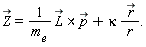
It is well known that  is a constant of the motion, i.e. is a constant of the motion, i.e.  . Switching to Quantum Mechanics, this condition reads . Switching to Quantum Mechanics, this condition reads

where, for hermiticity purpose, the expression of  must be symmetrized must be symmetrized
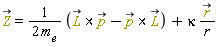 . .
In what follows, departing from the Hamiltonian H, the basic commutation rules between position , momentum , momentum  and angular momentum and angular momentum  in tensor notation, we derive the following commutation rules between the quantum Hamiltonian, angular momentum and Runge-Lenz vector in tensor notation, we derive the following commutation rules between the quantum Hamiltonian, angular momentum and Runge-Lenz vector 
Since H commutes with both   and and  , defining , defining
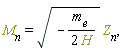
these commutation rules can be rewritten as
| |
This set constitutes the Lie algebra of the SO(4) group.
|
|
| |
Conclusions
|
| |
In this presentation, we derived, step-by-step, the SO(4) symmetry of the Hydrogen atom and its spectrum using the symbolic computer algebra Maple system. The derivation was performed without departing from the results, entering only the main definition formulas in eqs. (1), (2) and (5), followed by using a few simplification commands - mainly Simplify, SortProducts and SubstituteTensor - and a handful of Maple basic commands, subs, lhs, rhs and isolate. The computational path that was used to get the results of sections 2 to 7 is not unique. Instead of searching for the shortest path, we prioritized clarity and illustration of the techniques that can be used to crack problems like this one.
This problem is mainly about simplifying expressions using two different techniques. First, expressions with noncommutative operands in products need reduction with respect to the commutator algebra rules that have been set. Second, products of tensorial operators require simplification using the sum rule for repeated indices and the symmetries of tensorial subexpressions. Those techniques, which are part of the Maple Physics simplifier, together with the SortProducts and SubstituteTensor commands for sorting the operands in products to apply tensorial identities, sufficed. The derivations were performed in a reasonably small number of steps.
Two different computational strategies - with and without differential operators - were used in sections 3 and 5, showing an approach for verifying results, a relevant issue in general when performing complicated algebraic manipulations. The Maple Physics ability to handle differential operators as noncommutative operands in products (as frequently done in paper and pencil computations) facilitates readability and ease in entering the computations. The complexity of those operations is then handled by one Physics:-Library command, ApplyProductsOfDifferentialOperators (see eqs. (47) and (83)).
Besides the Maple Physics ability to handle noncommutative tensor operators and simplify such operators using commutator algebra rules, it is interesting to note: a) the ability of the system to factorize expressions involving products of noncommutative operands (see eqs. (90) and (108)) and b) the extension of the algorithms for simplifying tensorial expressions [5] to the noncommutativity domain, used throughout this presentation.
It is also worth mentioning how equation labels can reduce the whole computation to entering the main definitions, followed by applying a few commands to equation labels. That approach helps to reduce the chance of typographical errors to a very strict minimum. Likewise, the fact that commands and equations distribute over each other allows cumbersome manipulations to be performed in simple ways, as done, for instance, in eqs. (8), (9) and (13).
Finally, it was significantly helpful for us to have the typesetting of results using standard mathematical physics notation, as shown in the presentation above.
|
| |
Appendix
|
| |
In this presentation, the input lines are preceded by a prompt > and the commands used are of three kinds: some basic Maple manipulation commands, the main Physics package commands to set things and simplify expressions, and two commands of the Physics:-Library to perform specialized, convenient, operations in expressions.
The basic Maple commands used
| • |
interface is used once at the beginning to set the letter used to represent the imaginary unit (default is I but we used i).
|
| • |
isolate is used in several places to isolate a variable in an expression, for example isolating x in  results in results in 
|
| • |
subs substitutes the left-hand side of an equation by the righ-hand side in a given target, for example  results in results in 
|
The Physics commands used
| • |
Setup is used to set algebra rules as well as the dimension of space, type of metric, and conventions as the kind of letter used to represent indices.
|
| • |
Commutator computes the commutator between two objects using the algebra rules set using Setup. If no rules are known to the system, it outputs a representation for the commutator that the system understands.
|
| • |
CompactDisplay is used to avoid redundant display of the functionality of a function.
|
| • |
d_[n] represents the ![`∂`[n]](/view.aspx?sf=208810_post/74d7ad63084dabfed00c6262c44f62e3.gif) tensorial differential operator. tensorial differential operator.
|
| • |
Define is used to define tensors, with or without specifying its components.
|
| • |
Dagger computes the Hermitian transpose of an expression.
|
| • |
Normal, Expand, Factor respectively normalizes, expands and factorizes expressions that involve products of noncommutative operands.
|
| • |
Simplify performs simplification of tensorial expressions involving products of noncommutative factors taking into account Einstein's sum rule for repeated indices, symmetries of the indices of tensorial subexpressions and custom commutator algebra rules.
|
| • |
SortProducts uses the commutation rules set using Setup to sort the non-commutative operands of a product in an indicated ordering.
|
The Physics:-Library commands used
| • |
Library:-ApplyProductsOfDifferentialOperators applies the differential operators found in a product to the product operands that appear to its right. For example, applying this command to  results in results in 
|
|
| |
References
|
| |
[1] W. Pauli, "On the hydrogen spectrum from the standpoint of the new quantum mechanics,” Z. Phys. 36, 336–363 (1926)
[2] S. Weinberg, "Lectures on Quantum Mechanics, second edition, Cambridge University Press," 2015.
[3] Veronika Gáliková, Samuel Kováčik, and Peter Prešnajder, "Laplace-Runge-Lenz vector in quantum mechanics in noncommutative space", J. Math. Phys. 54, 122106 (2013)
[4] Castro, P.G., Kullock, R. "Physics of the  hydrogen atom". Theor. Math. Phys. 185, 1678–1684 (2015). hydrogen atom". Theor. Math. Phys. 185, 1678–1684 (2015).
[5] L. R. U. Manssur, R. Portugal, and B. F. Svaiter, "Group-Theoretic Approach for Symbolic Tensor Manipulation," International Journal of Modern Physics C, Vol. 13, No. 07, pp. 859-879 (2002).
|
|






