janhardo

1007 Reputation

13 Badges

12 years, 120 days
B. Ed math

MaplePrimes Activity


These are replies submitted by janhardo

@Ronan 

> 


> 

with(UHG):

> 

Info();

Universal Hyperbolic Geometry (UHG) module – quick reference
============================================================
Available commands:

  BilinearForm           Compute the inner product (bilinear form) of two vectors under the given metric.
  BuildConicFromCanonical   Build the conic expression (quadratic form) from a canonical matrix C.
  Centroids              Return the four centroid points (homogeneous) from the canonical matrix C.
  CircumDualPoints       Compute the dual points of the circumlines as a 3x4 matrix.
  CircumJayPoints        Compute the four CircumJay points (intersection of circumline and Jay line).
  CircumWrenPoints       Compute the four CircumWren points.
  Circumcenters          Compute the four circumcenters (points) from the canonical matrix C.
  Circumcircles          Return expressions for the four circumcircles (quadratic forms in x,y,z).
  Circumlines            Return the four circumlines (homogeneous lines) from the canonical matrix C.
  ClassifyPoints         Classify each point of the triangle as inside (-1), on (0), or outside (1) the null conic.
  ClassifyTriangle       Classify the triangle based on vertex positions relative to the null conic.
  DetectGeometry         Determine the type of geometry (Euclidean, Hyperbolic, Elliptic) from the metric matrix J.
  Distance               Compute the distance between two vertices (by index) of a triangle given its canonical matrix C.
  DoubleTriangle         Return the three vertices of the double triangle (polar triangle) from the canonical matrix C.
  DualLine               Compute the dual (polar) of a line with respect to the conic given by matrix C.
  DualPoint              Compute the dual (polar) of a point with respect to the conic given by matrix C.
  FindOddPoint           In a mixed triangle (some points inside, some outside), find the 'odd' point that differs from the other two.
  GetInverseTransform    Compute the inverse of the prepared triangle matrix (from PreparePoints).
  GramMatrixUHG          Compute the Gram matrix G = A * J * A^T for a matrix of points. This is the first step in normalising a triangle.
  Info                   Display this help message. If no argument is given, list all commands with a short summary.
  IntersectionPlot       Plot the intersection curve of a surface F and a plane P in 3D.
  JayLines               Compute the four Jay lines from the canonical matrix C.
  JayWrenPoints          Compute the four JayWren points (intersection of Jay and Wren lines).
  LineFromPoints         Compute the homogeneous line through two points (cross product).
  Medians                Return the three median lines (homogeneous) from the canonical matrix C.
  Midlines               Compute the two midline lines (duals of the midpoints) with respect to the canonical conic.
  Midpoints              Compute the two midpoints (on the line) between vertices i and j of the triangle A.
  NormalizePoints        Normalise a triangle (3x3 matrix) to its canonical form. This is the main function for triangle analysis.
  NormalizePrepared      Normalise a triangle that has already been prepared with PreparePoints. Prints geometry type and triangle location.
  OppositePoints         Return the two points opposite to vertex i (the other two vertices).
  Oppositelines          Return the dual lines of the opposite points.
  PlotAll2D              Generate a 2D plot of the triangle and selected geometric elements in the Klein model (unit disk).
  PlotAll3D              Generate a 3D plot of the triangle and elements in projective or hyperboloid model.
  PlotCircumlinear       Project all objects onto the unit triangle plane x+y+z=1 (circumlinear coordinates).
  PlotConic              Plot a conic in the Klein model together with the null circle.
  PlotConicOnUnitTriangle   Plot the intersection of a conic with the unit triangle plane.
  PlotHierarchy          (Under development) Show the circumcenter hierarchy up to a given depth.
  PlotSteps              Print step‑by‑step instructions to manually build the circumlinear plot for a canonical matrix.
  PlotStepsArray         Generate a column of five plots showing step‑by‑step construction of the triangle analysis.
  PlotUnitTriangle       Plot the unit triangle (the simplex x+y+z=1) in 3D.
  PlotUnitTriangleWithConic3D   Comprehensive 3D plot of the unit triangle with a conic and optional UHG elements.
  PointFromLines         Compute the intersection point of two lines (cross product).
  PointLocation          Determine whether a point lies inside, on, or outside the null conic.
  PreparePoints          Scale and reorder the triangle so that it is ready for canonical normalisation.
  ProjectiveQuadrance    Compute the projective quadrance (an invariant) between two non‑null points.
  Quadrance              Compute the squared norm (quadrance) of a vector, which determines its position relative to the null conic.
  ScalePoints            Scale the triangle so that the quadrances of all points become ±1 (or 0 for ideal points).
  ShowGeometry           Print the detected geometry type and the metric matrix to the console.
  SidePoints             Compute the midpoints on the side opposite to vertex i.
  Sideliness             Compute the sidelines (duals of side points) opposite vertex i.
  SoundConics            Compute the four sound conics as coefficient lists (each list of 6 coefficients).
  SoundPoints            Compute the sound points from the tangent lines as a 3x4 matrix.
  Spread                 Compute the spread (sin² of the angle) between two non‑null vectors.
  Sydlines               Compute the two sydlines (duals of the syndpoints) with respect to the canonical conic.
  Syndpoints             Compute the two syndpoints (orthogonal midpoints) between vertices i and j.
  T_Axis                 Compute the T‑axis (a line) from the canonical matrix C.
  TangentLines           Compute the tangent lines at the circumdual points as a 3x4 matrix.
  TransformConic         Transform a conic matrix under the inverse prepared triangle (used in PlotConic).
  TwinCircumcircles      Return expressions for the four twin circumcircles (quadratic forms in x,y,z).
  U_Axis                 Compute the U‑axis (a line) from the canonical matrix C.
  V_Axis                 Compute the V‑axis (a line) from the canonical matrix C.
  WrenLines              Compute the four Wren lines from the canonical matrix C.

Use Info("command") for detailed help on a specific command.
Example: Info("NormalizePoints");

 
> 

J := Matrix([[1,0,0],[0,1,0],[0,0,-1]]):
a1 := [2/3, -3/2, 1]:
a2 := [-5/2, -3/2, 1]:
a3 := [1/2, 3, 5]:
A := Matrix([a1, a2, a3]):
res := NormalizePoints(A, J):
C := res["CanonicalMatrix"]:
dstcnc := BuildConicFromCanonical(C):

> 


> 

Info("BuildConicFromCanonical");

Purpose: Build the conic expression (quadratic form) from a canonical matrix C.
Parameters:
  C : canonical matrix (from NormalizePoints)
Returns: polynomial expression in x,y,z
Example: dstcnc := BuildConicFromCanonical(C);


> 

Info("PlotConicOnUnitTriangle");

Purpose: Plot the intersection of a conic with the unit triangle plane.
Parameters:
  conicExpr : polynomial or equation
  curveColor, curveThickness, showSurface, bereik
Returns: a 3D plot object
Example: PlotConicOnUnitTriangle(dstcnc, showSurface=true);


> 

PlotConicOnUnitTriangle(dstcnc);

 
> 

Info("PlotUnitTriangleWithConic3D");

Purpose: Comprehensive 3D plot of the unit triangle with a conic and optional UHG elements.
Parameters:
  conicExpr, planeExpr (default x+y+z-1),
  colors, transparencies, sizes, thicknesses, ranges,
  show_legend, plot_width, plot_height, legend_width, legend_height,
  elements (same as PlotAll2D plus "conic")
Returns: a 3D plot object (with optional legend).
Example: PlotUnitTriangleWithConic3D(dstcnc, x+y+z-1, elements=["conic","vertices"]);


> 


> 

PlotUnitTriangleWithConic3D(dstcnc, x+y+z-1, elements=["triangle","conic","vertices"],vertexColor ="red");

 
> 


> 


> 


> 


> 


> 


> 

J := Matrix([[1,0,0],[0,1,0],[0,0,-1]]):
a1 := [2/3, -3/2, 1]:
a2 := [-5/2, -3/2, 1]:
a3 := [1/2, 3, 5]:
A := Matrix([a1, a2, a3]):
res := NormalizePoints(A, J):
C := res["CanonicalMatrix"]:
dstcnc := BuildConicFromCanonical(C):

PlotUnitTriangleWithConic3D(dstcnc, x+y+z-1,
                            elements = ["all"],
                           (*showSurface = true,*)
                            show_legend = true);


> 


> 

PlotUnitTriangleWithConic3D(dstcnc, x+y+z-1,
                            triangleColor = "yellow",
                            curveColor = "cyan",
                            elements = ["conic","vertices"],
                            showSurface = true,
                            show_legend = true);


> 

PlotUnitTriangleWithConic3D(dstcnc, x+y+z-1,
                            triangleColor = "yellow",
                            curveColor = "cyan",
                            elements = ["triangle","conic","vertices"],
                            (*showSurface = true,*)
                            show_legend = true);

> 


Download UHG_module_versieA_19-8-2026.mw

@Ronan 

You're showing a lot of examples—that's great. Maybe the module could also use them if I make some code adjustments based on your comments?
Yes, everything was created using AI, and I don't know much about this subject, but by working on it, I'm starting to get a feel for it.

L := [1/2,1/3,1/4]:
(`%+`=`+`)(op(L));

better after a analyze 

(`%+`=`+`)(L[]);

The start idea is : can we simplify this integral ? ..even function ?
 to 

Ofcourse Maple can do this 

restart;
# 1. Original integrand
f := sinh((Pi-a)*x)/
     (cosh(Pi*x)*sinh(a*x)):

# 2. Symmetry
simplify(subs(x=-x,f)-f);

# 3. Normalize: t = a*x
g := simplify(subs(x=t/a,f)):

# 4. Introduce b = Pi/a
g := subs(Pi/a=b,g):

# 5. Convert hyperbolic functions
gexp := simplify(convert(g,exp)):

# 6. u = 2*t
K := simplify(subs(t=u/2,gexp)/2):

# 7. Identify the geometric factor
geom := sum((-1)^m*exp(-b*m*u),m=0..infinity):

# 8. Identify the digamma parameters
z := b*(m+1):
w := 1+b*m:

# 9. Digamma term
Dterm := (-1)^m*(Psi(z)-Psi(w)):

# 10. Replace b by Pi/a
Result :=
(2/a)*Sum(
 (-1)^m*
 (
   Psi(Pi*(m+1)/a)
   -Psi(1+Pi*m/a)
 ),
 m=0..infinity
);
                           

restart;
Digits := 30;

f := (x, a) -> piecewise(
    x = 0, (Pi - a)/a,
    sinh((Pi - a)*x) / (cosh(Pi*x) * sinh(a*x))
);

plot_f := proc(a)
    local Lx, Ly, piek, p, tekst;
    Lx := max(2, 10/a);
    Ly := max(1, 5/a);
    piek := (Pi - a)/a;   # hoogte bij x=0

    # Maak een punt op x=0 met een label
    p := plots:-pointplot(
        [[0, piek]],
        symbol = circle,
        symbolsize = 12,
        color = red
    );

    # Voeg een tekstlabel toe bij de piek
    tekst := plots:-textplot(
        [0.1*Lx, piek, sprintf("y = %.4f", piek)],
        align = {above, right},
        font = ["Arial", 12]
    );

    # Plot de functie met de extra elementen
    plot(
        f(x, a),
        x = -Lx .. Lx,
        y = -Ly .. Ly,
        thickness = 2,
        numpoints = 500,
        labels = ["x", "f_a(x)"],
        title = sprintf("Integrand for a = %g\nPiekhoogte = %.4f", a, piek)
    );
    # Combineer de plot met de markeringen
    plots:-display(%, p, tekst);
end proc:

Explore(plot_f(a), parameters = [a = 1 .. 20]);


It is an even function f(x) = f(-x) and the function is reflected across the y-axis
 

@Alfred_F 
Seems there is a stronger result.
 

@C_R 

Why doesn't that work?

Because Maple has to know the local section when the procedure is created.

Maple would first have to evaluate lhs(param) in order to determine what the local variable should be called.

That is not possible: the list of local variables is part of the procedure definition, whereas param only receives a value when the procedure is executed.

foo2 := proc(param)
    local vars, name, value;
    vars := table();
    name := lhs(param);
    value := rhs(param);
    vars[name] := value;
    # Now we can use vars[name] in further calculations
    # For example: vars[name] + 10
    vars[name] + 10;  # or something else
end proc:
foo2(a=1); 
                               11

@C_R 
If you use `local` in a procedure, the scope of the variables is limited to that procedure..

@one man 
Yes, there's more in the codegen package
Good luck! 
 

restart;
foo := proc(
    {
        b::numeric := 2,
        c::numeric := 3,
        d::numeric := 4
    }
)
    print(b, c, d);
end proc:
# Voorbeelden
foo();
foo(b=2, c=3, d=4);
foo(b=2, c=3, d=4);
foo(b=10);
foo(c=20, d=30);
foo(d=40, b=20, c=30);
                            2, 3, 4
                            2, 3, 4
                            2, 3, 4
                            10, 3, 4
                           2, 20, 30
                           20, 30, 40
using keyword parameters...

restart;
foo := proc(b::numeric, c::numeric, d::numeric)
    print(b, c, d);
end proc:
# Voorbeelden
foo(2, 3, 4);
foo(10, 3, 4);
foo(2, 20, 30);
foo(20, 30, 40);
                            2, 3, 4
                            10, 3, 4
                           2, 20, 30
                           20, 30, 40

positonal parameters ( what names (symbols) are for  2, 3 and 4  used for this educational example)in the procedure call ?   
A old problem is solved with using now : keyword parameters, with a procedure made with positional parameters 


@C_R 
Maple packages are also modules, and since you can store many procedures in them, you have everything in a single package.
If the module becomes large and slows down the worksheet, you can turn it into a library, and it will work again without any delay.

You can then create a module for the 1D PDEs that I’ve already started working on.
These are truly general solutions, and the code has already been adapted for numerical values of the parameters so that plots can be generated.

I still need to further improve the module code to display all test cases as general solutions and numerically with a plot.
The numerical PDE lends itself well to testing whether it satisfies the PDE.

Of course, everything can be done in even greater detail with units, but follow the methodology of the org.2000 approach to clarify the calculation method.

Then you’ll be following a physicist’s approach when you incorporate units, and I assume you’ll be using the SI system of units.


Problem 200 is the same problem here solved partly by @Rouben Rostamian  
The module code must be corrected , because it is not a Neumann Boundry Condition, but Dirichlet BC
Also problematic to get a 3D plot and animation.


@C_R 


3.1 Diffusion in 1D


https://www.12000.org/my_notes/pde_in_CAS/maple_2026_1_and_mma_15/indexsubsection156.htm#x181-1800003.1.1

> 

restart;

HeatPDE := module()

option package;

uses plots, plottools, PDEtools;

export
    Problem,
    Solution,
    ShowProblem,
    AnalyzeProblem,
    PlotTitle,
    PDEPlot,
    SolveProblem,
    ShowSolution,
    RunProblem;

    (* -----------------------------------------------------------------
       Probleemdefinitie
       ----------------------------------------------------------------- *)
    Problem := proc()
    module()
    option object;
    export
        Title,
        PDE,
        BC,
        IC,
        Domain,
        PDEType,
        BCType,
        DomainType,
        ICType,
        Assumptions;
    end module;
    end proc;

    (* -----------------------------------------------------------------
       Oplossingsobject
       ----------------------------------------------------------------- *)
    Solution := proc()
    module()
    option object;
    export
        Solution,
        Method,
        MapleCall,
        Verified,
        CPUTime,
        Warnings;
    end module;
    end proc;

    (* -----------------------------------------------------------------
       Toon probleemgegevens
       ----------------------------------------------------------------- *)
    ShowProblem := proc(P)
        printf("Titel: %a\n", P:-Title);
        printf("PDE : %a\n", P:-PDE);
        printf("BC  : %a\n", P:-BC);
        printf("IC  : %a\n", P:-IC);
        printf("Domein: %a\n", P:-Domain);
        if assigned(P:-Assumptions) then
            printf("Aannames: %a\n", P:-Assumptions);
        end if;
        NULL;
    end proc;

    (* -----------------------------------------------------------------
       Analyse
       ----------------------------------------------------------------- *)
    AnalyzeProblem := proc(P)
        local R, ICrhs;

        R := rhs(P:-PDE);
        if has(R, diff(u(x,t), x$2)) then
            P:-PDEType := "Diffusie";
        else
            P:-PDEType := "Onbekend";
        end if;

        if type(P:-BC, list) and nops(P:-BC) = 2 then
            if has(lhs(P:-BC[1]), diff) or has(lhs(P:-BC[1]), D) or
               has(lhs(P:-BC[2]), diff) or has(lhs(P:-BC[2]), D) then
                P:-BCType := "Neumann-randvoorwaarden";
            else
                if rhs(P:-BC[1]) = 0 and rhs(P:-BC[2]) = 0 then
                    P:-BCType := "Dirichlet-randvoorwaarden (homogeen)";
                else
                    P:-BCType := "Dirichlet-randvoorwaarden (niet-homogeen)";
                end if;
            end if;
        else
            P:-BCType := "Algemene randvoorwaarden";
        end if;

        P:-DomainType := "Eindig interval";

        ICrhs := rhs(P:-IC);
        if type(ICrhs, 'function') or has(ICrhs, function) then
            P:-ICType := "Algemene functie";
        else
            P:-ICType := "Constante of eenvoudige uitdrukking";
        end if;

        NULL;
    end proc;

    (* -----------------------------------------------------------------
       Titel voor de plot – met PDEtools:-declare voor mooie notatie
       ----------------------------------------------------------------- *)
    PlotTitle := proc(P)
        local u, x, t, k, L;
        # declareer u(x,t) met afgeleide-notatie (u_t, u_xx)
        PDEtools:-declare(u(x,t), prime=t);
        # Gebruik de opgemaakte uitdrukkingen
        return typeset(P:-IC, "\n", P:-PDE);
    end proc;

    (* -----------------------------------------------------------------
       Schematische plot van het probleem
       ----------------------------------------------------------------- *)
    PDEPlot := proc(P)
        local ttl, bc1_str, bc2_str, Lval;

        AnalyzeProblem(P);
        ttl := PlotTitle(P);

        bc1_str := convert(P:-BC[1], string);
        bc2_str := convert(P:-BC[2], string);

        # Haal de rechtergrens uit Domain, of gebruik 'L' als symbool
        if type(P:-Domain, list) and nops(P:-Domain) = 2 then
            Lval := P:-Domain[2];
        else
            Lval := 'L';
        end if;

        plots:-display(
            plottools:-rectangle([0,-1], [10,1], color=white, linestyle=solid),
            plottools:-line([2,0], [8,0], thickness=3, color=black),
            plottools:-point([2,0], symbol=solidcircle, symbolsize=16, color=red),
            plottools:-point([8,0], symbol=solidcircle, symbolsize=16, color=red),
            plots:-textplot([2, -0.3, bc1_str], align={above, right}, font=[TIMES,12]),
            plots:-textplot([8, -0.3, bc2_str], align={above, left}, font=[TIMES,12]),
            plots:-textplot([2, -0.7, P:-BCType], align={above, right}, font=[TIMES,10, ITALIC]),
            plots:-textplot([8, -0.7, P:-BCType], align={above, left}, font=[TIMES,10, ITALIC]),
            plots:-textplot([2, 0.15, "0"], align={below}, font=[TIMES,12]),
            plots:-textplot([8, 0.15, sprintf("%a", Lval)], align={below}, font=[TIMES,12]),
            title = ttl,
            titlefont = [TIMES, BOLD, 14],
            axes = none,
            size = [900, 300],
            scaling = constrained
        );
    end proc;

    (* -----------------------------------------------------------------
       Oplossen met pdsolve
       ----------------------------------------------------------------- *)
    SolveProblem := proc(P)
        local eqs, sol, S;

        eqs := [P:-PDE, P:-IC, op(P:-BC)];

        if assigned(P:-Assumptions) then
            sol := pdsolve(eqs, u(x,t), output=realtime) assuming op(P:-Assumptions);
        else
            sol := pdsolve(eqs, u(x,t), output=realtime);
        end if;

        S := Solution();
        S:-Solution := sol;
        S:-Method   := "pdsolve";
        S:-MapleCall:= "pdsolve(... output=realtime)";
        S:-Verified := "Niet geverifieerd";
        S:-CPUTime  := "Niet gemeten";
        S:-Warnings := "";

        return S;
    end proc;

    (* -----------------------------------------------------------------
       Toon oplossing
       ----------------------------------------------------------------- *)
    ShowSolution := proc(S)
        print(S:-Solution);
        NULL;
    end proc;

    (* -----------------------------------------------------------------
       Volledige run – plot wordt zichtbaar
       ----------------------------------------------------------------- *)
    RunProblem := proc(P)
        local S;
        ShowProblem(P);
        AnalyzeProblem(P);
        print(PDEPlot(P));
        S := SolveProblem(P);
        ShowSolution(S);
        return S;
    end proc;

end module:


> 


> 

with(HeatPDE):

P := Problem();
P:-Title := "Problem 151 - constante beginvoorwaarde";
P:-PDE   := diff(u(x,t), t) = (1/100)*diff(u(x,t), x$2);
P:-BC    := [u(0,t)=0, u(10,t)=0];
P:-IC    := u(x,0)=100;
P:-Domain:= [0,10];
P:-Assumptions := [];

S := RunProblem(P);

# 3D‑plot: standaard tot t=5
PlotSolution(S, P);

# Met fijnere resolutie en andere eindtijd
PlotSolution(S, P, T=10, gridpts=100);

_m2061121821120


"Problem 151 - constante beginvoorwaarde"


diff(u(x, t), t) = (1/100)*(diff(diff(u(x, t), x), x))


[u(0, t) = 0, u(10, t) = 0]


u(x, 0) = 100


[0, 10]


[]


Titel: "Problem 151 - constante beginvoorwaarde"
PDE : diff(u(x,t),t) = 1/100*diff(diff(u(x,t),x),x)
BC  : [u(0,t) = 0, u(10,t) = 0]
IC  : u(x,0) = 100
Domein: [0, 10]
Aannames: []


u(x, t)*`will now be displayed as`*u


`derivatives with respect to`*t*`of functions of one variable will now be displayed with '`


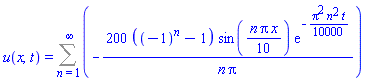
u(x, t) = Sum(-200*((-1)^n-1)*sin((1/10)*n*Pi*x)*exp(-(1/10000)*Pi^2*n^2*t)/(n*Pi), n = 1 .. infinity)


_m2061155048096


PlotSolution(_m2061155048096, _m2061121821120)


PlotSolution(_m2061155048096, _m2061121821120, T = 10, gridpts = 100)

(1.1)
> 


probleem 150

 
> 

with(HeatPDE);

P := Problem():
P:-Title := "Problem 150":
P:-PDE   := diff(u(x,t), t) = k * diff(u(x,t), x$2):
P:-BC    := [u(0,t) = 0, u(L,t) = 0]:
P:-IC    := u(x,0) = f(x):
P:-Domain:= [0, L]:
P:-Assumptions := [k > 0, L > 0]:

# Voer alles uit
S := RunProblem(P):

# Nu kun je met P en S verder werken
printf("Gebruikte methode: %a\n", S:-Method);
oplossing := S:-Solution;

[AnalyzeProblem, PDEPlot, PlotTitle, Problem, RunProblem, ShowProblem, ShowSolution, Solution, SolveProblem]


Titel: "Problem 150"
PDE : diff(u(x,t),t) = k*diff(diff(u(x,t),x),x)
BC  : [u(0,t) = 0, u(L,t) = 0]
IC  : u(x,0) = f(x)
Domein: [0, L]
Aannames: [0 < k, 0 < L]


u(x, t)*`will now be displayed as`*u


`derivatives with respect to`*t*`of functions of one variable will now be displayed with '`


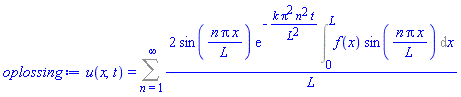
u(x, t) = Sum(2*sin(n*Pi*x/L)*exp(-k*Pi^2*n^2*t/L^2)*(Int(f(x)*sin(n*Pi*x/L), x = 0 .. L))/L, n = 1 .. infinity)


Gebruikte methode: "pdsolve"


u(x, t) = Sum(2*sin(n*Pi*x/L)*exp(-k*Pi^2*n^2*t/L^2)*(Int(f(x)*sin(n*Pi*x/L), x = 0 .. L))/L, n = 1 .. infinity)

(2.1)
> 


probleem 151

 
> 

# 1. Laad de module (als die nog niet geladen is)
with(HeatPDE);

# 2. Maak een nieuw probleemobject
P := Problem():

# 3. Vul de gegevens in volgens de opgave
P:-Title := "Problem 151 - Warmtegeleiding met constante beginvoorwaarde":
P:-PDE   := diff(u(x,t), t) = (1/100) * diff(u(x,t), x$2):   # k = 1/100
P:-BC    := [u(0,t) = 0, u(10,t) = 0]:                       # L = 10
P:-IC    := u(x,0) = 100:                                    # f(x) = 100
P:-Domain:= [0, 10]:                                         # L = 10
P:-Assumptions := []:                                        # Geen extra aannames nodig

# 4. Voer de volledige analyse, plot en oplossing uit
S := RunProblem(P):

[AnalyzeProblem, PDEPlot, PlotTitle, Problem, RunProblem, ShowProblem, ShowSolution, Solution, SolveProblem]


Titel: "Problem 151 - Warmtegeleiding met constante beginvoorwaarde"
PDE : diff(u(x,t),t) = 1/100*diff(diff(u(x,t),x),x)
BC  : [u(0,t) = 0, u(10,t) = 0]
IC  : u(x,0) = 100
Domein: [0, 10]
Aannames: []


u(x, t)*`will now be displayed as`*u


`derivatives with respect to`*t*`of functions of one variable will now be displayed with '`


u(x, t) = Sum(-200*((-1)^n-1)*sin((1/10)*n*Pi*x)*exp(-(1/10000)*Pi^2*n^2*t)/(n*Pi), n = 1 .. infinity)

(3.1)
> 


probleem 152


> 

# 1. Laad de module (als die nog niet geladen is)
with(HeatPDE):

# 2. Maak een nieuw probleemobject
P := Problem():

# 3. Vul de gegevens in volgens de opgave
P:-Title := "Problem 152 - Beginvoorwaarde u = x(1-x)":
P:-PDE   := diff(u(x,t), t) = (1/100) * diff(u(x,t), x$2):   # k = 1/100
P:-BC    := [u(0,t) = 0, u(1,t) = 0]:                       # L = 1
P:-IC    := u(x,0) = x*(1-x):                               # f(x) = x(1-x)
P:-Domain:= [0, 1]:                                         # L = 1
P:-Assumptions := []:                                       # Geen extra aannames

# 4. Voer de volledige analyse, plot en oplossing uit
S := RunProblem(P):

Titel: "Problem 152 - Beginvoorwaarde u = x(1-x)"
PDE : diff(u(x,t),t) = 1/100*diff(diff(u(x,t),x),x)
BC  : [u(0,t) = 0, u(1,t) = 0]
IC  : u(x,0) = x*(1-x)
Domein: [0, 1]
Aannames: []


u(x, t)*`will now be displayed as`*u


`derivatives with respect to`*t*`of functions of one variable will now be displayed with '`


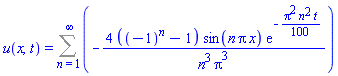
u(x, t) = Sum(-4*((-1)^n-1)*sin(n*Pi*x)*exp(-(1/100)*Pi^2*n^2*t)/(n^3*Pi^3), n = 1 .. infinity)

(4.1)
> 


probleem 153

 
> 

# 1. Laad de module (als die nog niet geladen is)
with(HeatPDE):

# 2. Maak een nieuw probleemobject
P := Problem():

# 3. Vul de gegevens in volgens de opgave
P:-Title := "Problem 153 - Haberman 2.3.3 (a)":
P:-PDE   := diff(u(x,t), t) = k * diff(u(x,t), x$2):   # algemene diffusiecoëfficiënt k
P:-BC    := [u(0,t) = 0, u(L,t) = 0]:                 # homogene Dirichlet
P:-IC    := u(x,0) = 6 * sin(9*Pi*x/L):               # specifieke beginvoorwaarde
P:-Domain:= [0, L]:                                   # lengte L (symbool)
P:-Assumptions := [k > 0, L > 0]:                     # fysische aannames voor pdsolve

# 4. Voer de volledige analyse, plot en oplossing uit
S := RunProblem(P):

Titel: "Problem 153 - Haberman 2.3.3 (a)"
PDE : diff(u(x,t),t) = k*diff(diff(u(x,t),x),x)
BC  : [u(0,t) = 0, u(L,t) = 0]
IC  : u(x,0) = 6*sin(9*Pi*x/L)
Domein: [0, L]
Aannames: [0 < k, 0 < L]


u(x, t)*`will now be displayed as`*u


`derivatives with respect to`*t*`of functions of one variable will now be displayed with '`


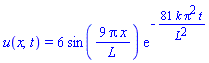
u(x, t) = 6*sin(9*Pi*x/L)*exp(-81*k*Pi^2*t/L^2)

(5.1)
> 


probleem 160

 
> 

# 1. Laad de module (als die nog niet geladen is)
with(HeatPDE):

# 2. Maak een nieuw probleemobject
P := Problem():

# 3. Vul de gegevens in volgens de opgave
P:-Title := "Problem 160 - Warmte met bronterm Q(x) (algemeen)":
P:-PDE   := diff(u(x,t), t) = k * diff(u(x,t), x$2) + Q(x):   # inhomogene PDE
P:-BC    := [u(0,t) = 0, u(L,t) = 0]:                         # homogene Dirichlet
P:-IC    := u(x,0) = f(x):                                    # algemene beginvoorwaarde
P:-Domain:= [0, L]:                                           # lengte L (symbool)
P:-Assumptions := [k > 0, L > 0]:                             # fysische aannames

# 4. Voer de volledige analyse, plot en oplossing uit
S := RunProblem(P):

Titel: "Problem 160 - Warmte met bronterm Q(x) (algemeen)"
PDE : diff(u(x,t),t) = k*diff(diff(u(x,t),x),x)+Q(x)
BC  : [u(0,t) = 0, u(L,t) = 0]
IC  : u(x,0) = f(x)
Domein: [0, L]
Aannames: [0 < k, 0 < L]


u(x, t)*`will now be displayed as`*u


`derivatives with respect to`*t*`of functions of one variable will now be displayed with '`


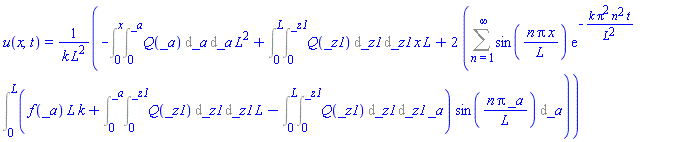
u(x, t) = (-(Int(Int(Q(_a), _a = 0 .. _a), _a = 0 .. x))*L^2+(Int(Int(Q(_z1), _z1 = 0 .. _z1), _z1 = 0 .. L))*x*L+2*(Sum(sin(n*Pi*x/L)*exp(-k*Pi^2*n^2*t/L^2)*(Int((f(_a)*L*k+(Int(Int(Q(_z1), _z1 = 0 .. _z1), _z1 = 0 .. _a))*L-(Int(Int(Q(_z1), _z1 = 0 .. _z1), _z1 = 0 .. L))*_a)*sin(n*Pi*_a/L), _a = 0 .. L)), n = 1 .. infinity)))/(k*L^2)

(6.1)
> 


> 


> 


problem 196

 
> 

# 1. Laad de module (als die nog niet geladen is)
with(HeatPDE):

# 2. Maak een nieuw probleemobject
P := Problem():

# 3. Vul de gegevens in volgens de opgave
P:-Title := "Problem 196 - Gemengde (Robin) randvoorwaarden":
P:-PDE   := diff(u(x,t), t) = k * diff(u(x,t), x$2);
P:-BC    := [
    D[1](u)(0,t) + u(0,t) = 0,          # Robin BC aan linkerzijde
    D[1](u)(L,t) + u(L,t) = 0           # Robin BC aan rechterzijde
]:
P:-IC    := u(x,0) = f(x):
P:-Domain:= [0, L]:
P:-Assumptions := [k > 0, L > 0]:

# 4. Voer de volledige analyse, plot en oplossing uit
S := RunProblem(P):

diff(u(x, t), t) = k*(diff(diff(u(x, t), x), x))


Titel: "Problem 196 - Gemengde (Robin) randvoorwaarden"
PDE : diff(u(x,t),t) = k*diff(diff(u(x,t),x),x)
BC  : [D[1](u)(0,t)+u(0,t) = 0, D[1](u)(L,t)+u(L,t) = 0]
IC  : u(x,0) = f(x)
Domein: [0, L]
Aannames: [0 < k, 0 < L]


u(x, t)*`will now be displayed as`*u


`derivatives with respect to`*t*`of functions of one variable will now be displayed with '`


u(x, t) = Sum(2*(-Pi*n*cos(n*Pi*x/L)+sin(n*Pi*x/L)*L)*exp(-k*Pi^2*n^2*t/L^2)*(Int(f(x)*(-Pi*n*cos(n*Pi*x/L)+sin(n*Pi*x/L)*L), x = 0 .. L))/(L*(Pi^2*n^2+L^2)), n = 1 .. infinity)

(7.1)
> 


problem 167

 
> 

# 1. Laad de module (als die nog niet geladen is)
with(HeatPDE):

# 2. Maak een nieuw probleemobject
P := Problem():

# 3. Vul de gegevens in volgens de opgave
P:-Title := "Problem 167 - Variabele coëfficiënten: u_t = x^2 u_xx + x u_x":
P:-PDE   := diff(u(x,t), t) = x^2 * diff(u(x,t), x$2) + x * diff(u(x,t), x):
P:-BC    := [u(1,t) = 0, u(b,t) = 0]:
P:-IC    := u(x,0) = f(x):
P:-Domain:= [1, b]:
P:-Assumptions := [b > 1]:   # x in (1,b), dus positief, en b>1

# 4. Voer de volledige analyse, plot en oplossing uit
S := RunProblem(P):

Titel: "Problem 167 - Variabele coëfficiënten: u_t = x^2 u_xx + x u_x"
PDE : diff(u(x,t),t) = x^2*diff(diff(u(x,t),x),x)+x*diff(u(x,t),x)
BC  : [u(1,t) = 0, u(b,t) = 0]
IC  : u(x,0) = f(x)
Domein: [1, b]
Aannames: [1 < b]


u(x, t)*`will now be displayed as`*u


`derivatives with respect to`*t*`of functions of one variable will now be displayed with '`


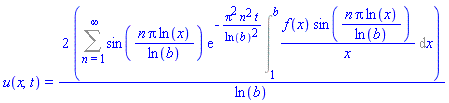
u(x, t) = 2*(Sum(sin(n*Pi*ln(x)/ln(b))*exp(-Pi^2*n^2*t/ln(b)^2)*(Int(f(x)*sin(n*Pi*ln(x)/ln(b))/x, x = 1 .. b)), n = 1 .. infinity))/ln(b)

(8.1)
> 


> 


Voorbeeld: Problem 200 – Warmteflux aan één uiteinde

 
> 


with(HeatPDE):

# ===================================================================
# 1. Definieer het probleem
# ===================================================================
P := Problem():

P:-Title := "Problem 200 - Warmteflux aan linkerzijde":
P:-PDE   := diff(u(x,t), t) = k * diff(u(x,t), x$2):
# Randvoorwaarden:
#   -k * u_x(0,t) = q0   (warmteflux)  =>  u_x(0,t) = -q0/k
#   u(L,t) = 0
P:-BC    := [D[1](u)(0,t) = -q0/k, u(L,t) = 0]:
# Beginvoorwaarde: staaf is aanvankelijk op temperatuur 0
P:-IC    := u(x,0) = 0:
P:-Domain:= [0, L]:
P:-Assumptions := [k > 0, L > 0, q0 > 0]:

# ===================================================================
# 2. Los op en toon resultaten
# ===================================================================
S := RunProblem(P):

Titel: "Problem 200 - Warmteflux aan linkerzijde"
PDE : diff(u(x,t),t) = k*diff(diff(u(x,t),x),x)
BC  : [D[1](u)(0,t) = -q0/k, u(L,t) = 0]
IC  : u(x,0) = 0
Domein: [0, L]
Aannames: [0 < k, 0 < L, 0 < q0]


u(x, t)*`will now be displayed as`*u


`derivatives with respect to`*t*`of functions of one variable will now be displayed with '`


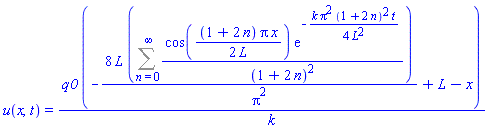
u(x, t) = q0*(-8*L*(Sum(cos((1/2)*(1+2*n)*Pi*x/L)*exp(-(1/4)*k*Pi^2*(1+2*n)^2*t/L^2)/(1+2*n)^2, n = 0 .. infinity))/Pi^2+L-x)/k

(9.1)
> 


Download 1D_warmte_pde_met_voorbeelden_31-7-2026.mw

@ianmccr
Thanks for the extensibve answer, very useful.
I asked chatgpt something:

My expectation

For someone developing a large Maple library, I expect that ChatGPT combined with Maple MCP will ultimately be more powerful than the current built-in Maple AI. ChatGPT is better suited to assisting with software architecture, library design, refactoring, documentation, and explaining complex algorithms, while Maple, through MCP, performs the symbolic and numerical computations, executes the code, and verifies its correctness.

That said, the overall experience will depend on how extensively the Maple MCP server exposes the active Maple session and worksheet to ChatGPT. This is an implementation detail that Maplesoft will need to document more thoroughly as the Maple MCP platform continues to evolve.

You'll need two subscriptions:
- I'm currently using the cheapest ChatGPT plan: “Go”
- The second subscription is with Maplesoft, and you can also choose a package for the Maple Elite Maintenance Program there, depending on your AI usage (just like with ChatGPT, where you can also choose a package)

1 2 3 4 5 6 7 Last Page 3 of 91