This post is about the visualization of a gyroscopic phenomenon of a rotating body. MapleSim models and a description for those who do not have MapleSim are provided for their own analysis. Implementation with other tools like Maple might give further insight into the phenomenon.
With appropriate initial conditions, a ball thrown into a tube can pop out of the tube. This can be reproduced with a MapleSim model
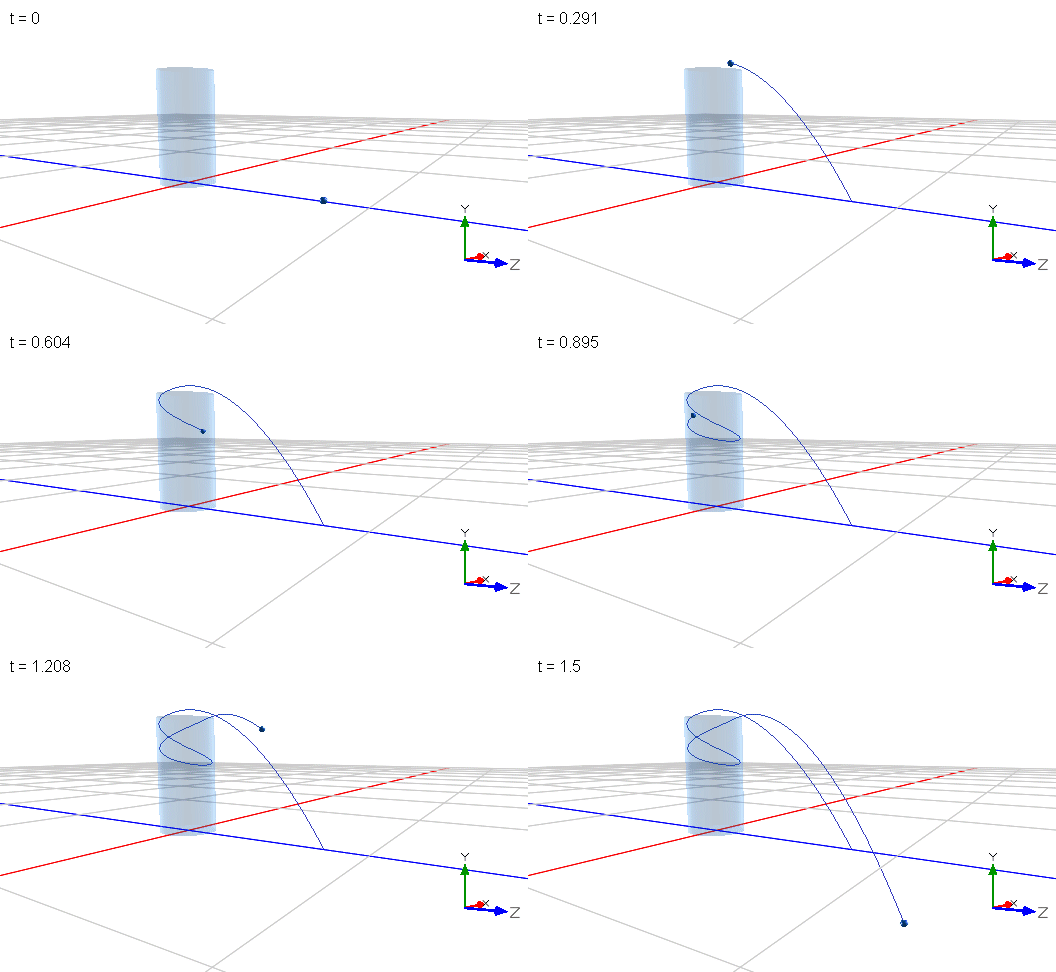
Throwing_a_ball_into_a_tube_A.msim
To hit a perfect shot without trial and error, time reversal was applied for the model (reversed calculation results of a ball exiting the tube are used as initial conditions for the shot). This worked straight away and shows that this model is sufficiently conservative.
This phenomenon has recently attracted attention on YouTube. For example, Steve Mold demonstrates the effect and provides an intuitive explanation which he considers incomplete because the resulting vertical oscillation of the ball does not match theory and his experiments. He suspects that the assumption of a constant axis of rotation of the ball is responsible for this discrepancy.
However, he cannot demonstrate a change of the axis of rotation. In general, the visualization of the rotation axis of a ball is difficult to achieve in an experiment. On the contrary, visualization is much easier in a simulation experiment with this model:
Throwing_a_ball_into_a_tube_B.msim
The following can be observed for a trajectroy that does not exit the tube:
At the apex (the top) of the trajectory, the vector of rotation (red bold in the following images) points downwards and is essentially parallel to the axis of the cylinder. The graph to the left shows the vertical (in green) position and one horizontal position (in red). The model applies gravity in negative y direction.

On the way down, the axis of rotation points away from the direction of travel (the ball orbits counterclockwise in the top view).

At the bottom, the vector of rotation points towards the axis of the cylinder.

On the way up, the axis of rotation points in the direction of travel.

These observations confirm that the assumption of a constant axis of rotation is too simplified. Effectively the ball performs a precession movement know from gyroscopes. More specifically, the precession movement of the rotation axis rotates in the opposite direction of the rotation of the ball.
However, the knowledge and the visualization of this precession movement do not provide more insight for a better intuitive explanation of the effect. As the ball acts like a gyroscope, a second attempt is to visualize forces that perturb the motion of the ball. Besides gravity, there are contact forces exerted by the tube. The normal force at the contact as well as the gravitational force cannot generate a perturbing momentum since they point to the center of the ball. Only frictional forces at the contact can cause a perturbing momentum.
Contrary to the visualization of the axis of rotation, visualization of contact forces is not straight forward in MapleSim, because neither the contact point nor the contact forces are directly provided by components of the MapleSim library. Only for a single contact point, a work-around is possible by measuring the reactive forces on the tube and then displaying these forces in a moving reference frame at the contact point. The location and the orientation of this frame are calculated with built-in mathematical components. To illustrate the additional effort, the image below highlights in yellow the components only needed for the visualization of the above images, all other components were required to visualize the contact forces and frictional moments.

Throwing_a_ball_into_a_tube_C3.msim
It required many attempts to get to a working model. Several kinematic models for a rotating reference frame at the contact point failed. Finally, mathematical operations on kinematic signals (measured by sensors) and motion drivers were successful.
In the following, the model is used to visualize the right-hand rule for the following vectors:
- in green the disturbing frictional moment
- in red (now with a double headed arrow) the angular velocity (for a sphere it points in the same direction as the vector of the angular momentum and the axis of rotation)
- in pink the vector of the angular velocity of the precession movement
At the top, the vector of precession indicates that the axis of rotation is diverted away from the direction of travel (i.e. pointing backwards). This is in line with the above image of the ball “on the way down”.

At the bottom, the vector of precession indicates also that the axis of rotation is diverted away from the direction of travel. This however cannot be seen in the above image of the ball “on the way up”. This discrepancy is an indication that the vector of angular velocity of the precession movement might not sufficiently predict the future orientation of the axis of rotation.

Overall, there is little symmetry in the two extreme positions at the top and at the bottom. A bending of the trajectory downwards (pitching down) at the top indicated by the vector of precession, cannot be seen at the bottom: The vector of precession does not indicate a bending of the trajectory in an upward direction.
It turns out that the right-hand rule does not provide the hoped-for better explanation either. However, the model was not a complete waste of time since it provided two unexpected and very counterintuitive observations:
- At the bottom, the speed of the balls center is the lowest. For an object descending in a gravitational field, one would expect a gain in speed. A closer look at the graph of the angular velocity (lower graph) reveals that the ball is spinning at the highest rate at the bottom. This means that potential and kinetic energy at the top are converted to rotational energy at the bottom.
- Although the ball slows down (and speeds up in angular velocity) while descending there is no frictional force component in circumferential direction. Seen from above, the ball orbits at constant velocity. Only a vertical frictional force component acts all the time. Frictional forces in circumferential direction slowing down the ball can only be seen at the beginning of the simulation when the ball slips on the tube up to the moment when it rolls without slippage.
Overall, the closer one looks, the less intuitive it gets. What makes this phenomenon so difficult to understand is the constantly changing constraint of the ball. At each time increment the location and orientation of the contact changes with respect to the direction of the (instantaneous) direction of precession. This makes the phenomenon so obscure. It might be easier to find an “intuitive” explanation for the tennis racket paradox (or intermediate axis theorem) where no external forces act.
Even with a physics background and the right-hand rule of precession at hand, it requires allot of imagination to predict the movement of the ball. This is, in my opinion, not intuitive at all for most people. After all, the premotor cortex of the human brain seems to have constant difficulties to learn precession – for sure precession prediction is not hardwired. If it was, the paradox wasn’t so perplexing, and we could imagine/predict what the golf ball does next.
In summary, this simulation experiment revealed details not known before (at least to me) about the phenomenon. The experiment did not provide more insight for a better intuitive explanation but on the contrary raised more questions. It is another case of “knowing more, but not getting smarter”.
At the very least, the simulations also show the benefits of carrying out virtual experiments under various conditions that are difficult or even impossible in an experiment. In any case, such experiments are of educational value - not only in classical physics.
Comments on the product:
It was possible to verify results of MapleSim: The model reproduces the magic numbers sqrt(7/2) and sqrt(5/2) for the ratios of circular rotation and vertical oscillation frequencies for a full and a hollow sphere respectively. See the first model.
The (laborious) work-around presented here cannot be applied to most real-world contact problems. Visualization of the contact point, contact forces and contact slippage are therefore a desirable extension to MapleSim’s contact capabilities. I do not think that this is provided by other tools.
A surface pattern for the ball would have been helpful to better visualize the rotation of the ball.
A moving observer view (in this case an observer in the reference frame of the contact) could facilitate observation.
Further viewing:
- The physical engine of Blender was used in a video to reproduce the phenomenon qualitatively.
- There is an ”improved” intuitive explanation of Steve Mold’s explanation which uses frictional forces and provides physical background. It is not clear to me which part of the visualization is animated and which is physically simulated. At least some sequences do not make sense: The vector of the external frictional moment on the ball suddenly changes direction. The “improved” intuitive explanation also states that the rotational axis leans constantly toward the contact point. I do not see this in my simulation (the contact point is indicated with a red dot in the images above). Also, the precession vectors in my simulation did not reveal an intuitive explanation for a reduction in vertical oscillation frequency.
Further work:
- Is the vertical oscillation truly sinusoidal as the horizontals are?
- Is the point of contact always in the northern hemisphere of the ball? More general: In one hemisphere?
- In a simulation without gravity: Does the vector of precession better predict the trajectory?
- ...






