MapleSim Questions and Posts

These are Posts and Questions associated with the product, MapleSim

We have just released updates to Maple and MapleSim.

Maple 2024.2 includes ability to tear away tabs into new windows, improvements to scrollable matrices, corrections to PDF export, small improvements throughout the math engine, and more.  We recommend that all Maple 2024 users install this update.

This update also include a fix to the problem with the simplify extension mechanism, as first reported on MaplePrimes. Thanks, as always, for helping us make Maple better.

This update is available through Tools>Check for Updates in Maple, and is also available from the Maple 2024.2 download page, where you can find more details.

At the same time, we have also released an update to MapleSim, which contains a variety of improvements to MapleSim and its add-ons. You can find more information on the MapleSim 2024.2 download page.

In the attachment is an attempt with undesireable rendering artefacts

I did not use color functions because I intend to export the black fields of the ball to stl format to use them for a better visualisation of spinning spheres in MapleSim.

A related question: The generating function for the chessboard looks complicated to me. Maybe there is a more elegant way to do it.

Chessboard_sphere.mw

This post is about the visualization of a gyroscopic phenomenon of a rotating body. MapleSim models and a description for those who do not have MapleSim are provided for their own analysis. Implementation with other tools like Maple might give further insight into the phenomenon.

With appropriate initial conditions, a ball thrown into a tube can pop out of the tube. This can be reproduced with a MapleSim model
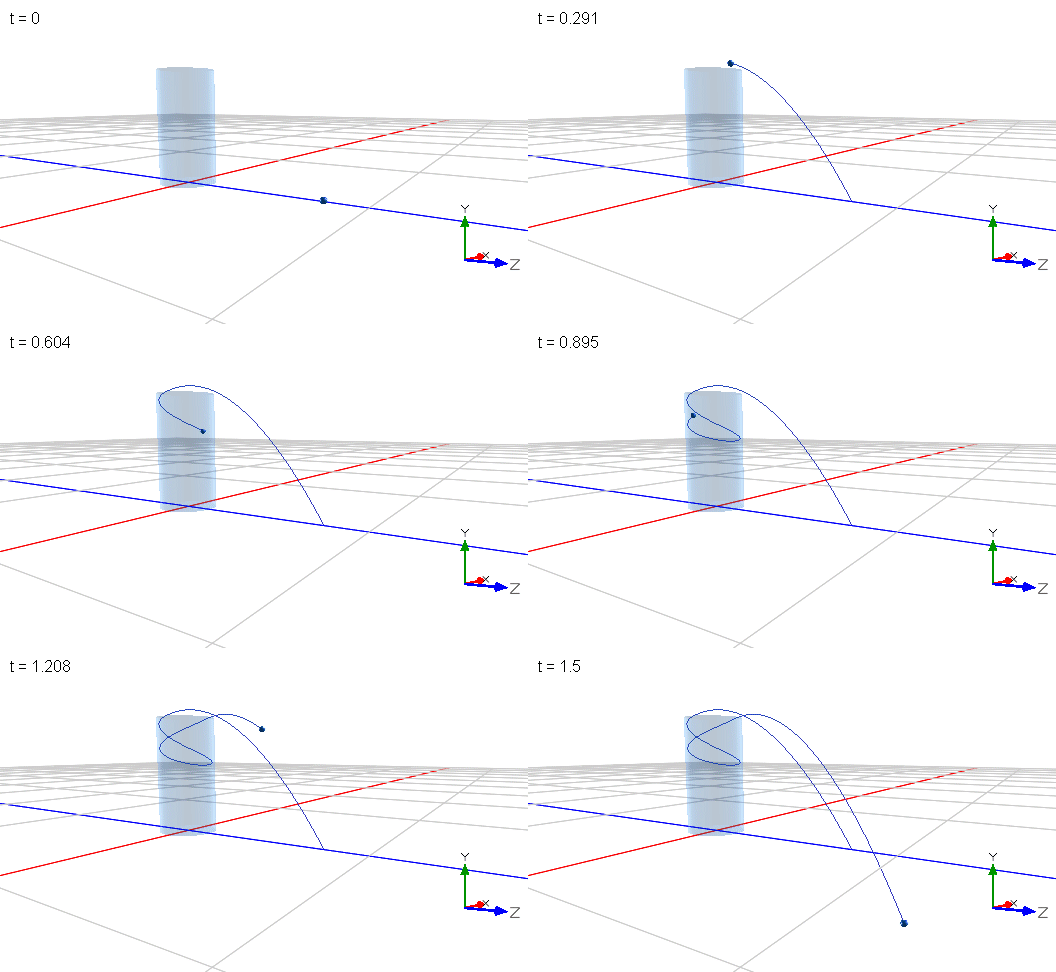
Throwing_a_ball_into_a_tube_A.msim

To hit a perfect shot without trial and error, time reversal was applied for the model (reversed calculation results of a ball exiting the tube are used as initial conditions for the shot). This worked straight away and shows that this model is sufficiently conservative.

This phenomenon has recently attracted attention on YouTube. For example, Steve Mold demonstrates the effect and provides an intuitive explanation which he considers incomplete because the resulting vertical oscillation of the ball does not match theory and his experiments. He suspects that the assumption of a constant axis of rotation of the ball is responsible for this discrepancy.

However, he cannot demonstrate a change of the axis of rotation. In general, the visualization of the rotation axis of a ball is difficult to achieve in an experiment. On the contrary, visualization is much easier in a simulation experiment with this model:

Throwing_a_ball_into_a_tube_B.msim

The following can be observed for a trajectroy that does not exit the tube:

At the apex (the top) of the trajectory, the vector of rotation (red bold in the following images) points downwards and is essentially parallel to the axis of the cylinder. The graph to the left shows the vertical (in green) position and one horizontal position (in red). The model applies gravity in negative y direction.

Ein Bild, das Text, Diagramm, Screenshot, Reihe enthält.

Automatisch generierte Beschreibung 

On the way down, the axis of rotation points away from the direction of travel (the ball orbits counterclockwise in the top view).

Ein Bild, das Text, Diagramm, Screenshot, Reihe enthält.

Automatisch generierte Beschreibung

At the bottom, the vector of rotation points towards the axis of the cylinder.

Ein Bild, das Text, Diagramm, Screenshot, Reihe enthält.

Automatisch generierte Beschreibung

On the way up, the axis of rotation points in the direction of travel.

Ein Bild, das Text, Diagramm, Screenshot, Reihe enthält.

Automatisch generierte Beschreibung

These observations confirm that the assumption of a constant axis of rotation is too simplified. Effectively the ball performs a precession movement know from gyroscopes. More specifically, the precession movement of the rotation axis rotates in the opposite direction of the rotation of the ball.

However, the knowledge and the visualization of this precession movement do not provide more insight for a better intuitive explanation of the effect. As the ball acts like a gyroscope, a second attempt is to visualize forces that perturb the motion of the ball. Besides gravity, there are contact forces exerted by the tube. The normal force at the contact as well as the gravitational force cannot generate a perturbing momentum since they point to the center of the ball. Only frictional forces at the contact can cause a perturbing momentum.

Contrary to the visualization of the axis of rotation, visualization of contact forces is not straight forward in MapleSim, because neither the contact point nor the contact forces are directly provided by components of the MapleSim library. Only for a single contact point, a work-around is possible by measuring the reactive forces on the tube and then displaying these forces in a moving reference frame at the contact point. The location and the orientation of this frame are calculated with built-in mathematical components. To illustrate the additional effort, the image below highlights in yellow the components only needed for the visualization of the above images, all other components were required to visualize the contact forces and frictional moments.
Ein Bild, das Text, Diagramm, Plan, parallel enthält.

Automatisch generierte Beschreibung
Throwing_a_ball_into_a_tube_C3.msim
It required many attempts to get to a working model. Several kinematic models for a rotating reference frame at the contact point failed. Finally, mathematical operations on kinematic signals (measured by sensors) and motion drivers were successful.  

In the following, the model is used to visualize the right-hand rule for the following vectors:

  • in green the disturbing frictional moment
  • in red (now with a double headed arrow) the angular velocity (for a sphere it points in the same direction as the vector of the angular momentum and the axis of rotation)
  • in pink the vector of the angular velocity of the precession movement

At the top, the vector of precession indicates that the axis of rotation is diverted away from the direction of travel (i.e. pointing backwards). This is in line with the above image of the ball “on the way down”.

Ein Bild, das Screenshot, Text, Diagramm, Reihe enthält.

Automatisch generierte Beschreibung

At the bottom, the vector of precession indicates also that the axis of rotation is diverted away from the direction of travel. This however cannot be seen in the above image of the ball “on the way up”. This discrepancy is an indication that the vector of angular velocity of the precession movement might not sufficiently predict the future orientation of the axis of rotation.

Overall, there is little symmetry in the two extreme positions at the top and at the bottom. A bending of the trajectory downwards (pitching down) at the top indicated by the vector of precession, cannot be seen at the bottom: The vector of precession does not indicate a bending of the trajectory in an upward direction.

It turns out that the right-hand rule does not provide the hoped-for better explanation either. However, the model was not a complete waste of time since it provided two unexpected and very counterintuitive observations:

  • At the bottom, the speed of the balls center is the lowest. For an object descending in a gravitational field, one would expect a gain in speed. A closer look at the graph of the angular velocity (lower graph) reveals that the ball is spinning at the highest rate at the bottom. This means that potential and kinetic energy at the top are converted to rotational energy at the bottom.
  • Although the ball slows down (and speeds up in angular velocity) while descending there is no frictional force component in circumferential direction. Seen from above, the ball orbits at constant velocity. Only a vertical frictional force component acts all the time. Frictional forces in circumferential direction slowing down the ball can only be seen at the beginning of the simulation when the ball slips on the tube up to the moment when it rolls without slippage.

Overall, the closer one looks, the less intuitive it gets. What makes this phenomenon so difficult to understand is the constantly changing constraint of the ball. At each time increment the location and orientation of the contact changes with respect to the direction of the (instantaneous) direction of precession. This makes the phenomenon so obscure. It might be easier to find an “intuitive” explanation for the tennis racket paradox (or intermediate axis theorem) where no external forces act.

Even with a physics background and the right-hand rule of precession at hand, it requires allot of imagination to predict the movement of the ball. This is, in my opinion, not intuitive at all for most people. After all, the premotor cortex of the human brain seems to have constant difficulties to learn precession – for sure precession prediction is not hardwired. If it was, the paradox wasn’t so perplexing, and we could imagine/predict what the golf ball does next.

In summary, this simulation experiment revealed details not known before (at least to me) about the phenomenon. The experiment did not provide more insight for a better intuitive explanation but on the contrary raised more questions. It is another case of “knowing more, but not getting smarter”.

At the very least, the simulations also show the benefits of carrying out virtual experiments under various conditions that are difficult or even impossible in an experiment. In any case, such experiments are of educational value  - not only in classical physics.


Comments on the product:

It was possible to verify results of MapleSim: The model reproduces the magic numbers sqrt(7/2) and sqrt(5/2) for the ratios of circular rotation and vertical oscillation frequencies for a full and a hollow sphere respectively. See the first model.

The (laborious) work-around presented here cannot be applied to most real-world contact problems. Visualization of the contact point, contact forces and contact slippage are therefore a desirable extension to MapleSim’s contact capabilities. I do not think that this is provided by other tools.

A surface pattern for the ball would have been helpful to better visualize the rotation of the ball.

A moving observer view (in this case an observer in the reference frame of the contact) could facilitate observation.

Further viewing:

  • The physical engine of Blender was used in a video to reproduce the phenomenon qualitatively.
  • There is an ”improved” intuitive explanation of Steve Mold’s explanation which uses frictional forces and provides physical background. It is not clear to me which part of the visualization is animated and which is physically simulated. At least some sequences do not make sense: The vector of the external frictional moment on the ball suddenly changes direction. The “improved” intuitive explanation also states that the rotational axis leans constantly toward the contact point. I do not see this in my simulation (the contact point is indicated with a red dot in the images above). Also, the precession vectors in my simulation did not reveal an intuitive explanation for a reduction in vertical oscillation frequency.

Further work:

  • Is the vertical oscillation truly sinusoidal as the horizontals are?
  • Is the point of contact always in the northern hemisphere of the ball? More general: In one hemisphere?
  • In a simulation without gravity: Does the vector of precession better predict the trajectory?
  • ...
     

I was wondering if there is a way to measure/extract the contact forces that occur during a contact event? Preferably I would like to visualize the contact forces in the 3D result view.

I would also like to extract information about slippage in a contact.

Is this somehow possible?

I'm excited to announce the creation of a new LinkedIn group, Maple Software Community! This group is dedicated to discussions about the use of Maple software and is designed to be a valuable resource for undergraduate and graduate students, researchers, and all Maple enthusiasts.

By joining this community, you'll have the opportunity to:

  • Learn about upcoming events and workshops that can enhance your skills.
  • Stay informed on the latest projects that leverage Maple software.
  • Engage in discussions that explore the many uses of Maple across various fields.
  • Connect with Maple ambassadors and users worldwide who are eager to share their knowledge and experience.

Whether you're a seasoned user or just starting out with Maple, your contributions to this group are welcome and encouraged. Let's build a thriving community together!


Looking forward to seeing you there! 

Maple Software Community

On a Windows 10 installation with

I get after system restart and Maple launch

followed by

What could be the cause that the update is not downloading and how to fix it?


HI, I saw an example in Maplesim where the speed of the Unwinder roller is modeled as a feedback control from the dancer's position, the radius of the Unwinder roller, to maintain a constant speed of the web.

I was wondering how the Unwinder roller radius (m) was divided by the target constant web speed (Lamp signal (m/s)) and added from the dancer's angle to achieve feedback control of the Unwinder roller.


We have just released an update to Maple. Maple 2024.1 includes improvements to the math engine, PDF export, the Physics package, command completion, and more. As always, we recommend that all Maple 2024 users install this update. In particular, please note that this update includes fixes to ODESteps and simplifying integrals, as reported on Maple Primes. Thanks for helping us, and other users, by letting us know!

At the same time, we have also released an update to MapleSim. MapleSim 2024.1.1 includes improvements to FMU import/export, plotting, co-simulation, and more, as well as enhancements to the Web Handling Library.

These updates are available through Tools>Check for Updates in Maple or MapleSim, and are also available from the Download Product Updates section of our web site, where you can find more details.

This post summarizes links for those who have not studied numerical integration methods from scratch and are interested in simulation settings in MapleSim (like me).

The MapleSim help pages simulation settings and advanced simulation settings give first guidance for the trained user but do not provide explanations or links for the terms used in the description of the settings (as for example: stiffness, constraint stabilization, constraint projection, events and event iteration,...).

It can easily be overlooked that Maple help pages provide further information for most of the terms. Under the assumption that MapleSim uses the same terminology as Maple, I recommend to first have a look at Maple help topics before consulting the web or other resources. Since searching and retrieving can be time consuming, I made a list of helpful links.

There are still some open points. I would be happy for more links and help in filling these gaps.


How Maple simulates

?MapleSimUserGuide,Chapter04:
section 4.1 How MapleSim Simulates a Model

?tasks,generatingCode

Ein Bild, das Text, Screenshot, Diagramm, Design enthält.

Automatisch generierte Beschreibung


Solvers

An overview of solvers: ?dsolve,numeric

Differential Algebraic Equation introduction: ?MaplePortal,DAE

Overview of numeric differential-algebraic equation solvers (index reduction, constraint drift, projection):
 ?examples/numeric_DAE and ?dsolve,numeric,DAE_extension

Stiffness and stiff solvers

Stiffness and stiff IVPs: ?dsolve,Stiffness

Events

?dsolve,numeric,Events

Time events and state events

Event handling:

?MapleSimUserGuide,Chapter04:
section 4.1 How MapleSim Simulates a Model

Event iteration:

?MapleSimUserGuide,Chapter05:
section 5.5 Selecting the Code Generation Options

Iteration, hysteresis, Intermediate steps: ?tasks,generatingCode

Hysteresis:

Hysteresis in value or also in time?

Do variable solvers adapt the value of event hysteresis during runtime?


Baumgarte constraint stabilization, unconstrained dynamics, constrained dynamics

?MapleSim,Multibody,Dynamic_Exports
(in combination with ?MapleSim,Multibody,Kinematic_Exports)

?examples/numeric_DAE

?tasks,generatingCode

?MapleSimUserGuide,Chapter05:
section 5.5 Selecting the Code Generation Options

Error control

              ?dsolve,numeric,Error_Control

              Absolute error: ?dsolve,numeric,IVP

              Relative error: (relative to what?)

Index1 error control and Index1 Tollerance: see solvers

Scaling

scalemethod (this does not seem to exist in Maple)


Examples (Multibody)

Events

                            Catapult
                            (from MapleSim>Help>Examples>Physical Domains>Multibody)
                            contact events

                          Catapult_-_Events.msim

                            Throwing a ball
                            (from MapleSim>Help>Examples>Physical Domains>Multibody)

                            conditional events (with boolean logic)

                          Throwing_a_Ball_-_Events.msim

              Solvers

              Conservation of energy of a pendulum depends on solvers.
                           Euler increases energy, implict Euler dissipates energy.

             Pendulum_for_solver_comparision.msim


Constraint dirft/projection

              2-d rigid slider crank

               (from MapleSim>Help>Examples>Physical Domains>Multibody)

              projection off leads to assembly desintegration after 2000 s simulation

             2D_Rigid_Slider_Crank_-_constraint_projection.msim

                         A stiff solver improves constraint drift, but only delays desintegration

                         Baumgarte constraint stabilization prevents simulation error but shows dislocated rigid body frames


On the corresponding Modelica page I find

Since MapleSim 2024 now has been upgraded to Modelica 4.0 (which I appreciate very much by the way - Thank you), I was wondering if I could give this libraray a try?

I am looking for simple ways to set up digital controllers in the context of developement of code for micro-controllers. From the github page:

Furthermore, in sublibrary Controller about 20 input/output blocks of linear systems are provided that are based on the different representation forms, e.g., PID, StateSpace, Filter blocks. A unique feature of these blocks is that it is very convenient to quickly switch between a continuous and a discrete block representation. Also, templates are provide to quickly built-up standard controller structures. 

I’m excited to announce that we’ve just launched MapleSim 2024.

The new release has tools that are designed to drive innovation, and overall save you time when creating and developing simulations.

At Maplesoft we are looking to continually enhance our engineering software with new features based on customer feedback, and I’m pleased to share some of the fruits of that labor, and thank the developers, product management team, and  customers that contributed.

The new offering  helps engineers to

  • Rapidly Tune Parameters
  • Explore Design Concepts
  • Expand Modeling Capabilities

For example, the new Rerun panel allows you to significantly cut the time between simulations as you quickly apply different parameter values, initial conditions and even simulation settings between runs. It does this by skipping the formulation steps when there are no structural changes made to the model, and you can even see the plots and results of the different iterations side by side.
You can see it in action in this short demo video.

There is now support for the latest Modelica feature set, so you can import Modelica Libraries that make use of MSL 4.0.0 features, and adds a range of new modeling components to the standard MapleSim libraries (electrical, 1-D mechanical, signal block and more).


MapleSim 2024 also includes more components in the Hydraulic library to support modeling of flow restrictions and adds a Scripting button to add and organize Maple worksheets.

We’ve also applied a whole series of updates to our MapleSim add-on products, including:

  • The MapleSim Web Handling Library has new tools for modeling heavier webs, winding of multiple rolls on the same drum, and adding a Switching Nip Roller to swing the web contact points between rollers.
  • The MapleSim Connector for FMI can now import and export FMI 3.0.
  • The MapleSim CAD Toolbox supports recent software releases from NX™, SOLIDWORKS®, Solid Edge®, Parasolid®, and other CAD tools.
  • The MapleSim Heat Transfer Library has gained a new T-junction component for the Water subpackage to improve flow/pressure-drop calculations for systems with branches.

We have an upcoming webinar for you to see the new 2024 features in MapleSim Web Handling Library – you can sign up to register here.

You can find out more about the other new features at the MapleSim What’s New web page, and as always, we are happy to hear your comments and product suggestions.

And if you are new to MapleSim and would like to try building and running a model yourself, you can request a free trial, or contact Maplesoft sales team with any questions.

Hi,

I am trying to convert from MapleSim to Simulink Matlab by using the S-function code Generation connector, but I got the above message when I uploaded the selected subsystem and I have no idea how can I fix it. Please help me


To observe the nip impact of the Variable Nip Roller, we created the following schematic and simulation. I set the y-coordinate of the Web to be the same, so I don't think there is a big problem for the Variable Nip Roller to simulate the nip. However, the simulation does not simulate with the warning "Nip is not on the contact arc". What is the reason for this and how can I set the nip arc again?


This is a Tension Zone, an example of web handling.


The example probe on Roller1 shows various probe items, such as summary_WrapAngle and summary_Slipvelocity, but the ex_probe I attached to the same roller shows only four probe items: angle, angular velocity, angular acceleration, and torque. Why are the items different even though they are probes on the same roller?

Maple Transactions frequently gets submissions that contain Maple code.  The papers (or videos, or Maple documents, or Jupyter notebooks) that we get are, if the author wants a refereed submission, sent to referees by a fairly usual academic process.  We look for well-written papers on topics of interest to the Maple community.

But we could use some help in reviewing code, for some of the submissions.  Usually the snippets are short, but sometimes the packages involved are more substantial.

If you would be interested in having your name on the list of potential code reviewers, please email me (or Paulina Chin, or Jürgen Gerhard) and we will gratefully add you.  You might not get called on immediately---it depends on what we have in the queue.

Thank you very much, in advance, for sharing your expertise.

Rob

1 2 3 4 5 6 7 Last Page 2 of 43